


Billing Report averaging the Apparent demand value instead of summing for custom measurements
Issue description:
A custom measurement is configured in the billing report for the Network Demand charge. The maximum value for the individual device shows the correct value, but the units column results in averaging the values instead of adding them.
Environment:
Power Monitoring Expert- Custom measurement
Cause:
The predicates and objects for custom measurement is not available in the database, which results in averaging the values instead of adding them.
Resolution:
“This article contains information about editing the database. Please note, that editing or updating anything in DB may cause permanent damage and result in PME functioning improperly. This procedure should only be performed by users familiar with SQL Server Management Studio. Kindly take a backup of the database before performing any such action.”
Compare the metadata for the custom measurement with the metadata for the Apparent Demand measurement using the below script.
Script to check the metadata for Apparent Demand:
SELECT TOP 1000
[Subject], [Predicate], [Object]
FROM [ION_Network].[dbo].[vTS_Triples]
where subject like 'Apparent Power Sliding Window Demand Delivered+Received'
Below is the result of metadata for apparent demand measurement,
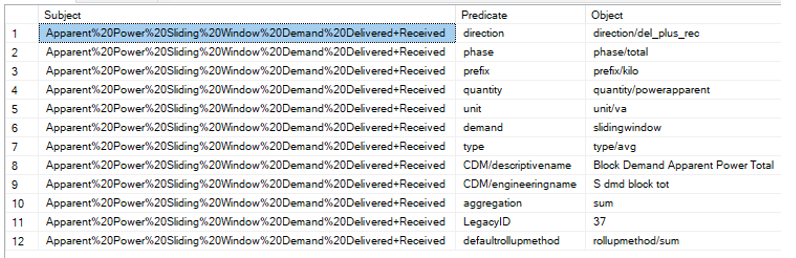
In this example, the customer measurement is ‘MD_kVA’. Run the same script for the customer measurement ‘MD_kVA’ and compare the result with metadata for Apparent Demand.
If the predicates and objects are missing for custom measurement, follow the below steps to insert the missing predicates and objects by using the attached script ‘PME - Measurement Edit’.
Step 1: From the attached script ‘PME - Measurement Edit’, set “@REPORT_MODE bit = 0” to insert the required predicate and object.
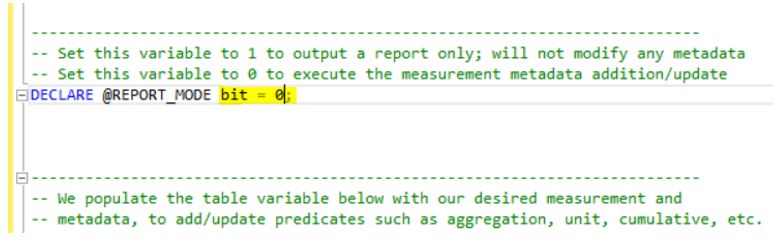
Step 2: Comment out the highlighted line in the attached query. Add the required Subject, Predicate, and Object and execute the query.

By doing this, the predicate and object will be added to the metadata for custom measurement.
Step 3: Add all the required predicates and objects one by one for the custom measurement.
Below is the image of metadata for custom measurement “MD_kVA” after inserting the required predicates and objects as in default measurement.
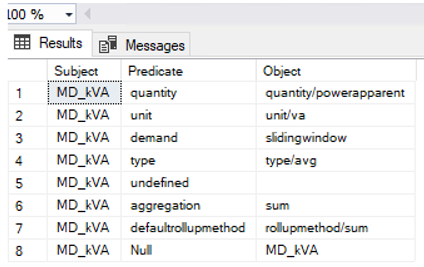
After inserting the Predicate and Object for the custom measurement in the database, the value in the Number of units column for the network demand charge will be added.
A custom measurement is configured in the billing report for the Network Demand charge. The maximum value for the individual device shows the correct value, but the units column results in averaging the values instead of adding them.
Environment:
Power Monitoring Expert- Custom measurement
Cause:
The predicates and objects for custom measurement is not available in the database, which results in averaging the values instead of adding them.
Resolution:
“This article contains information about editing the database. Please note, that editing or updating anything in DB may cause permanent damage and result in PME functioning improperly. This procedure should only be performed by users familiar with SQL Server Management Studio. Kindly take a backup of the database before performing any such action.”
Compare the metadata for the custom measurement with the metadata for the Apparent Demand measurement using the below script.
Script to check the metadata for Apparent Demand:
SELECT TOP 1000
[Subject], [Predicate], [Object]
FROM [ION_Network].[dbo].[vTS_Triples]
where subject like 'Apparent Power Sliding Window Demand Delivered+Received'
Below is the result of metadata for apparent demand measurement,
In this example, the customer measurement is ‘MD_kVA’. Run the same script for the customer measurement ‘MD_kVA’ and compare the result with metadata for Apparent Demand.
If the predicates and objects are missing for custom measurement, follow the below steps to insert the missing predicates and objects by using the attached script ‘PME - Measurement Edit’.
Step 1: From the attached script ‘PME - Measurement Edit’, set “@REPORT_MODE bit = 0” to insert the required predicate and object.
Step 2: Comment out the highlighted line in the attached query. Add the required Subject, Predicate, and Object and execute the query.
By doing this, the predicate and object will be added to the metadata for custom measurement.
Step 3: Add all the required predicates and objects one by one for the custom measurement.
Below is the image of metadata for custom measurement “MD_kVA” after inserting the required predicates and objects as in default measurement.
After inserting the Predicate and Object for the custom measurement in the database, the value in the Number of units column for the network demand charge will be added.