


Чем мы можем помочь сегодня?
Cannot open '.sta' that was created with Unity 10
Issue
Opening a Unity 10 '.sta' file with Unity 11 returns a conversion error.
Product Line
Unity 11 and above
Environment
Windows 10
Resolution
In UnityPro V8.0, if the 'Allow INT/DINT in place of ANY_BIT' project setting is enabled, Type Uint and UDint variables cannot be used in logic EF. This behavior is in accordance with information stated in the documentation (i.e."Type Uint and UDint variables should not be used for EF when dealing with generic ANY_BIT formal parameters."). However, the behavior was broken in Unity 10 and a build was incorrectly allowed. This was corrected in Unity 11. If you try to open the Unity 10 '.sta' file with Unity 11, a conversion error will get returned.
To resolve the issue,
-Open the '.stu' application with Unity 10.
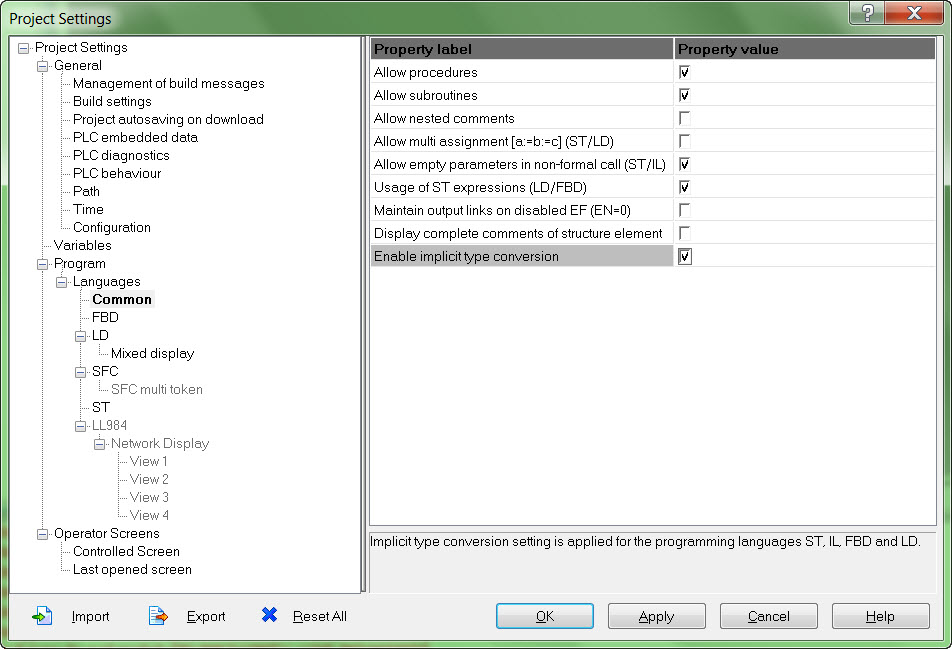
-Enable the 'Implicit Type Conversion' project setting.
-Rebuild.
-Save as a .'sta'
Opening a Unity 10 '.sta' file with Unity 11 returns a conversion error.
Product Line
Unity 11 and above
Environment
Windows 10
Resolution
In UnityPro V8.0, if the 'Allow INT/DINT in place of ANY_BIT' project setting is enabled, Type Uint and UDint variables cannot be used in logic EF. This behavior is in accordance with information stated in the documentation (i.e."Type Uint and UDint variables should not be used for EF when dealing with generic ANY_BIT formal parameters."). However, the behavior was broken in Unity 10 and a build was incorrectly allowed. This was corrected in Unity 11. If you try to open the Unity 10 '.sta' file with Unity 11, a conversion error will get returned.
To resolve the issue,
-Open the '.stu' application with Unity 10.
-Enable the 'Implicit Type Conversion' project setting.
-Rebuild.
-Save as a .'sta'
Опубликовано для: Schneider Electric Казахстан
Узнайте больше
Линейка:
Узнайте больше
Линейка:
Нужна помощь?
Инструмент для подбора продукции
Быстро и легко находите подходящие продукты и принадлежности для ваших условий применения.
Получить коммерческое предложение
Заполните заявку онлайн, и с вами свяжется наш эксперт.
Где купить?
Легко находите ближайшего к вам дистрибьютора Schneider Electric.
Центр поддержки
Находите ресурсы поддержки для всех ваших потребностей в одном месте.