


Чем мы можем помочь сегодня?
How to solve the Unity Pro V11.1 installation problem when the "Unity Pro Ethernet Configuration Tool" CDROM source request occurs.
Trying to install Unity 11.1, if the "Ethernet Configuration Tool" CDROM tool is requested:
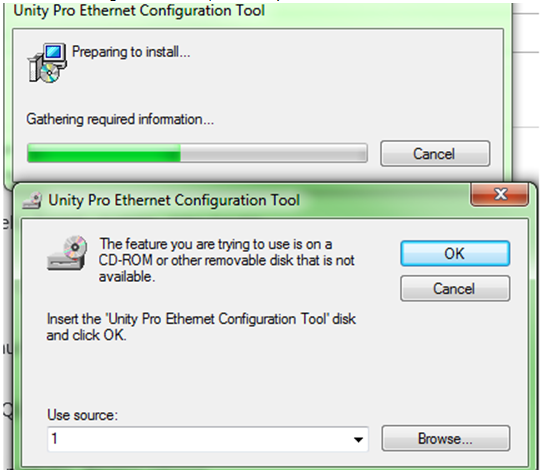
That means the installation process does find the original installation ressource about Unity pro ethernet configuration tool.
Two ways are possible to solve this problem:
- Try to manually uninstall (via the control panel, add/remove program) the "Unity Pro Ethernet configuration tool" and "Unity Pro PlantStructure DTM Library".
If the problem is the same,
- Use the free tool msicuu2.exe (attached) to force the "Unity Pro Ethernet configuration tool" and "Unity Pro PlantStructure DTM Library" uninstallation:
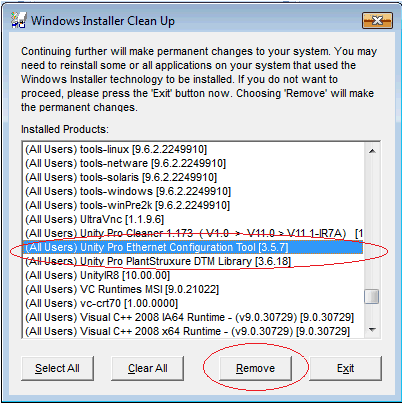
That means the installation process does find the original installation ressource about Unity pro ethernet configuration tool.
Two ways are possible to solve this problem:
- Try to manually uninstall (via the control panel, add/remove program) the "Unity Pro Ethernet configuration tool" and "Unity Pro PlantStructure DTM Library".
If the problem is the same,
- Use the free tool msicuu2.exe (attached) to force the "Unity Pro Ethernet configuration tool" and "Unity Pro PlantStructure DTM Library" uninstallation:
Опубликовано для: Schneider Electric Казахстан
Вложения
Узнайте больше
Линейка:
Узнайте больше
Линейка:
Нужна помощь?
Инструмент для подбора продукции
Быстро и легко находите подходящие продукты и принадлежности для ваших условий применения.
Получить коммерческое предложение
Заполните заявку онлайн, и с вами свяжется наш эксперт.
Где купить?
Легко находите ближайшего к вам дистрибьютора Schneider Electric.
Центр поддержки
Находите ресурсы поддержки для всех ваших потребностей в одном месте.