


Чем мы можем помочь сегодня?
Unity Pro V13.0 or greater version and Ecostruxure Control Expert applications Deactivating DEP cause integrity check message
Applying the FAQ FA325919 to deactivate the DEP cause attached integrity check message
when using Unity Pro 13.0 or greater version
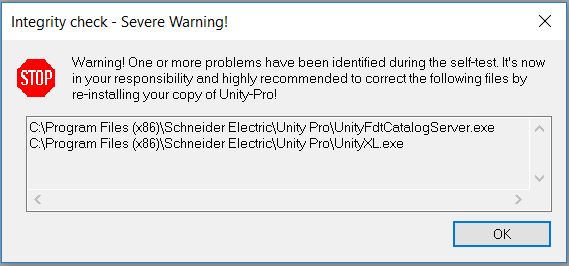
In spite of this message Unity Pro will work well.
For versions Unity Pro V13.1 and greater a specific HF is/will be published via the SESU. This HF deactives the DEP and recalcul the checksum.
Its name for Unity Pro V13.1 is UnityPro V13.1 HF0450243R DEP desactivation
Its name for Control Expert V14.0 is Control Expert V14.0 HF0450243R DEP desactivation
...
So if you desactived manually the DEP following recomendation provided inside the FAQ FA325919 please install the HF corresponding to your Unity Pro version.
when using Unity Pro 13.0 or greater version
In spite of this message Unity Pro will work well.
For versions Unity Pro V13.1 and greater a specific HF is/will be published via the SESU. This HF deactives the DEP and recalcul the checksum.
Its name for Unity Pro V13.1 is UnityPro V13.1 HF0450243R DEP desactivation
Its name for Control Expert V14.0 is Control Expert V14.0 HF0450243R DEP desactivation
...
So if you desactived manually the DEP following recomendation provided inside the FAQ FA325919 please install the HF corresponding to your Unity Pro version.
Опубликовано для: Schneider Electric Казахстан
Узнайте больше
Линейка:
Узнайте больше
Линейка:
Нужна помощь?
Инструмент для подбора продукции
Быстро и легко находите подходящие продукты и принадлежности для ваших условий применения.
Получить коммерческое предложение
Заполните заявку онлайн, и с вами свяжется наш эксперт.
Где купить?
Легко находите ближайшего к вам дистрибьютора Schneider Electric.
Центр поддержки
Находите ресурсы поддержки для всех ваших потребностей в одном месте.