


Чем мы можем помочь сегодня?
How to add EcoStruxure Augmented Operator Advisor node in a different version of Node-red brought with EcoStruxure Augmented Operator Advisor?
If the customer want add the node for Augmented operator in a different version of Node-red installed in the same time that Ecostruxure Augmented Operator Advisor, it is not possible to install the node as usual node. The Augmented operatornode cannot be found in Node-red website
To make it, need to:
1- Stop node-red where you want install the node
2- Copy the folder contained both Augmented operator node
« C:\Program Files (x86)\Schneider Electric\EcoStruxure Augmented Operator Advisor\node-red\node_modules\node-red-augmented-operator »
In
« C:\Users\<Windows-user>\.node-red\nodes\ »
If there is no folder "Nodes" you have to create it
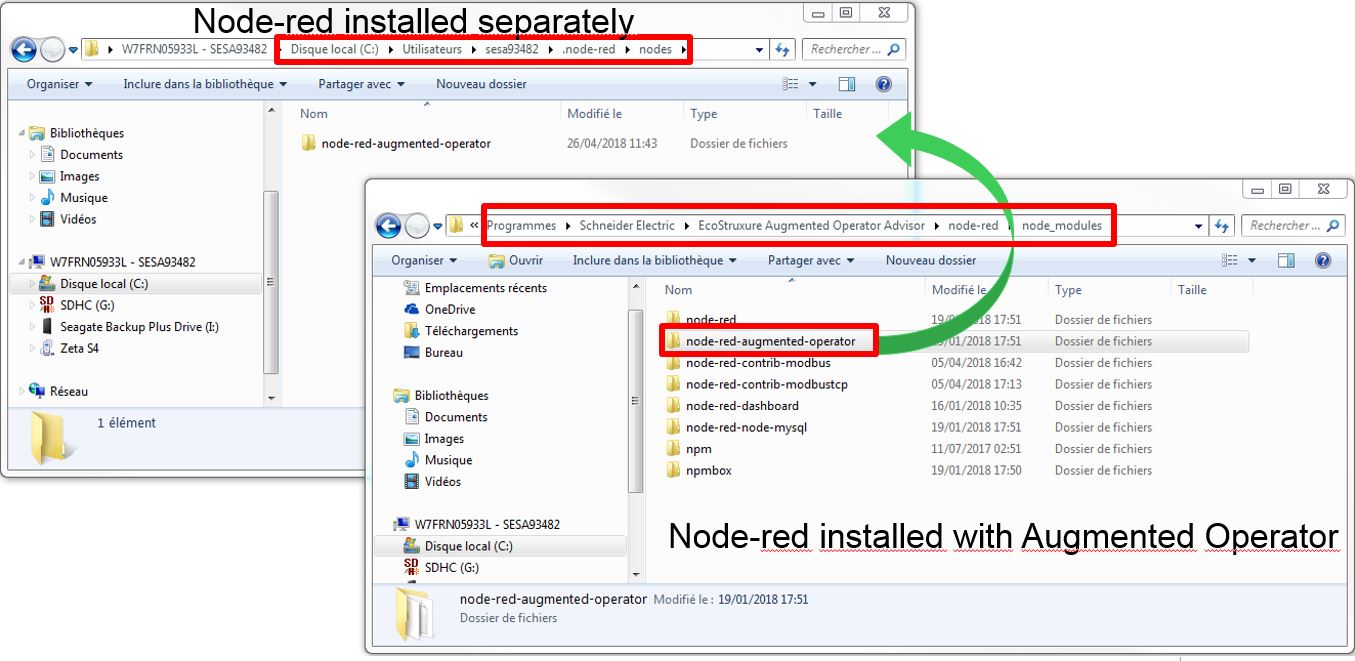
3- Restart Node-red
To make it, need to:
1- Stop node-red where you want install the node
2- Copy the folder contained both Augmented operator node
« C:\Program Files (x86)\Schneider Electric\EcoStruxure Augmented Operator Advisor\node-red\node_modules\node-red-augmented-operator »
In
« C:\Users\<Windows-user>\.node-red\nodes\ »
If there is no folder "Nodes" you have to create it
3- Restart Node-red
Опубликовано для: Schneider Electric Казахстан
Нужна помощь?
Инструмент для подбора продукции
Быстро и легко находите подходящие продукты и принадлежности для ваших условий применения.
Получить коммерческое предложение
Заполните заявку онлайн, и с вами свяжется наш эксперт.
Где купить?
Легко находите ближайшего к вам дистрибьютора Schneider Electric.
Центр поддержки
Находите ресурсы поддержки для всех ваших потребностей в одном месте.