


Чем мы можем помочь сегодня?
PME - Adding Offset to the Register Power Monitoring Expert Device Type Editor
Issue:
In PME Device Type Editor, there is no section displayed by default to add Offset for Modbus Registers.
Product Line:
Power Monitoring Expert 9.x
Power Monitoring Expert 2020
Power Monitoring Expert 2021
Power Monitoring Expert 2022
Power Monitoring Expert 2023
Environment:
Device Type Editor
Resolution:
1. Open Management Console > Tools > System > Device Type Editor
2. File > Open the translator you want to edit
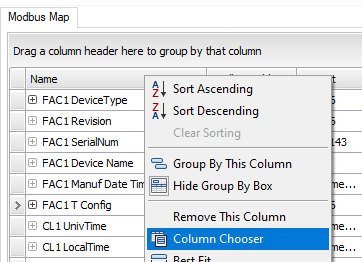
3. Right-click one of the default columns (i.e. Name, Register, Format, ION Handle, Mask, Scale) and select Column Chooser
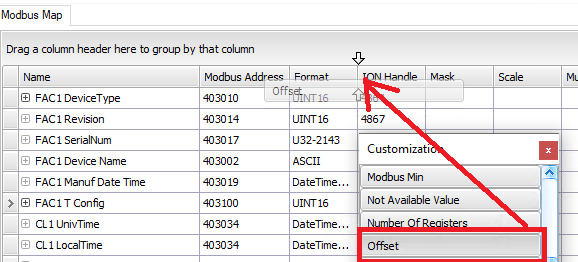
4. Scroll to find "Offset" and drag the Offset onto the column headers
In PME Device Type Editor, there is no section displayed by default to add Offset for Modbus Registers.
Product Line:
Power Monitoring Expert 9.x
Power Monitoring Expert 2020
Power Monitoring Expert 2021
Power Monitoring Expert 2022
Power Monitoring Expert 2023
Environment:
Device Type Editor
Resolution:
1. Open Management Console > Tools > System > Device Type Editor
2. File > Open the translator you want to edit
3. Right-click one of the default columns (i.e. Name, Register, Format, ION Handle, Mask, Scale) and select Column Chooser
4. Scroll to find "Offset" and drag the Offset onto the column headers
Опубликовано для: Schneider Electric Казахстан
Узнайте больше
Линейка:
Узнайте больше
Линейка:
Нужна помощь?
Инструмент для подбора продукции
Быстро и легко находите подходящие продукты и принадлежности для ваших условий применения.
Получить коммерческое предложение
Заполните заявку онлайн, и с вами свяжется наш эксперт.
Где купить?
Легко находите ближайшего к вам дистрибьютора Schneider Electric.
Центр поддержки
Находите ресурсы поддержки для всех ваших потребностей в одном месте.