

Issue:
Can I do a factory reset on the Altivar Process drive using SoMove Software?
Product Line:
ATV630 ATV930
Environment:
All serial numbers, all model numbers
Cause:
Customer had SoMove connection to the drive, and he wanted to use SoMove for factory reset.
Resolution:
Go to the Device tab on top of SoMove, select Factory Setting then choose Customize or Execute.
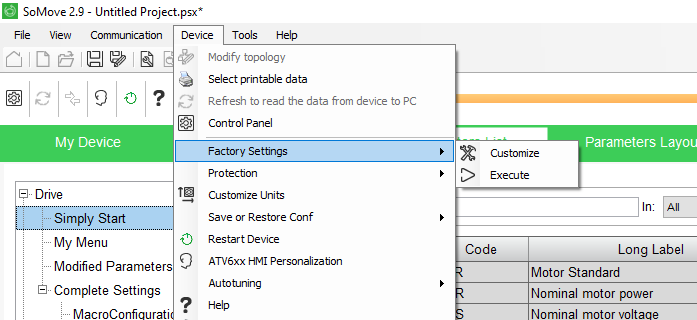
For Customize: select OEM or Schneider Electric factory settings and click OK. (Use OEM if directed by the equipment supplier).

For Execute: select All parameters or other options such as Drive configuration, Motor Control, Communications, Display Configurations and click apply.

You will have to acknowledge the Warning making sure you understand the risk before the Factory reset will be performed.

When the reset is complete you should see this dialog box:

Can I do a factory reset on the Altivar Process drive using SoMove Software?
Product Line:
ATV630 ATV930
Environment:
All serial numbers, all model numbers
Cause:
Customer had SoMove connection to the drive, and he wanted to use SoMove for factory reset.
Resolution:
Go to the Device tab on top of SoMove, select Factory Setting then choose Customize or Execute.
For Customize: select OEM or Schneider Electric factory settings and click OK. (Use OEM if directed by the equipment supplier).
For Execute: select All parameters or other options such as Drive configuration, Motor Control, Communications, Display Configurations and click apply.
You will have to acknowledge the Warning making sure you understand the risk before the Factory reset will be performed.
When the reset is complete you should see this dialog box:
Опубликовано для: Schneider Electric Казахстан

