


How to Activate SoMove License by Web
Issue:
How to Activate SoMove License by Web
Product Line:
Somove
Environment:
Somove
Cause:
n/a
Resolution:
Open application " Somove"
After 21 days of trial period, you need to register somove to continue using it.
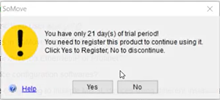
Click Yes to Register, No to discontinue
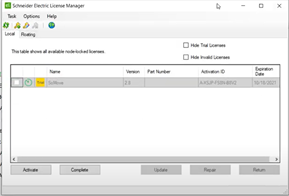
Go to License Manager and Put Activation ID
How to Activate SoMove License by Web
Product Line:
Somove
Environment:
Somove
Cause:
n/a
Resolution:
Open application " Somove"
After 21 days of trial period, you need to register somove to continue using it.
Click Yes to Register, No to discontinue
Go to License Manager and Put Activation ID
- Paste Activation ID. Click on Activate
- Choose “By Web portal” and click “Next”
- Copy Activation ID in separate lines. Click “Next”.
- You need a web user account to register your software. If you already have, fill in your email also create an user account. Click Next
- Give Path for License Request File in PC. Click Next
- Check the path and Click Next
- Go to Schneider License Portal and Process License request file
- Click on Search
- Click on Request processing
- Click the Browse button to select the license Request File
- Click the Submit button to start uploading and requesting the processing of the selected file and follow the instructions in the subsequent forms
- Download my License Response File
- Go to Schneider Electric License Manager,
- Here Give path of processed License file. Click on Next
- On Activation in Progress, there is completing transaction Click on Finish
- Close all and Open Somove