


How can we help you today?
How to disable FTP on an EGX300 gateway
Issue
A user would like to disable the internal FTP server on an EGX300 gateway.
Product Line
EGX300
Environment
EGX300 as an FTP Server
Cause
A user may need to disable FTP on TCP port 21 due to security requirements.
Resolution
1. Login to the EGX300 webpage by entering the EGX300 IP address into a browser address bar.
3. Click on the Ethernet & TCP/IP option

4. Click on Advanced
5 Select Disable on FTP server drop down
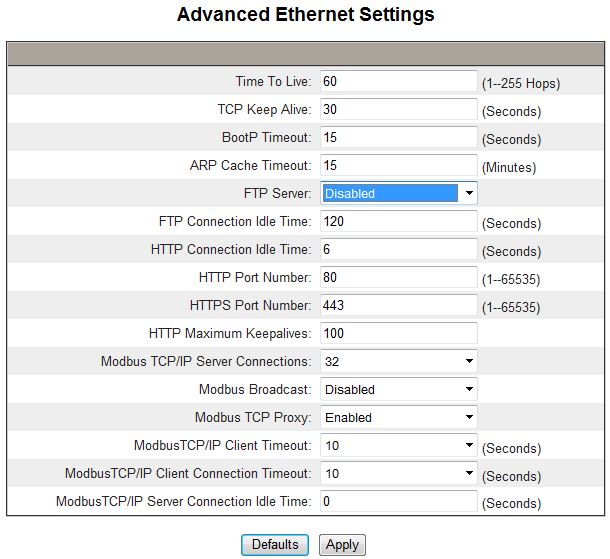
6. Click Apply
The EGX300 internal FTP server is now disabled.
A user would like to disable the internal FTP server on an EGX300 gateway.
Product Line
EGX300
Environment
EGX300 as an FTP Server
Cause
A user may need to disable FTP on TCP port 21 due to security requirements.
Resolution
1. Login to the EGX300 webpage by entering the EGX300 IP address into a browser address bar.
- The default login credentials:
- Username: Administrator
- Password: Gateway
3. Click on the Ethernet & TCP/IP option
4. Click on Advanced
5 Select Disable on FTP server drop down
6. Click Apply
The EGX300 internal FTP server is now disabled.
Released for: Schneider Electric Macedonia
Explore more
Range:

Explore more
Range:
Need help?
Get a Quote
Start your sales enquiry online and an expert will connect with you.
Where to buy?
Easily find the nearest Schneider Electric distributor in your location.
Help Centre
Find support resources for all your needs, in one place.