


Unity Pro/ Control Expert Simulator security option
Issue:
Unity Pro/ Control Expert Simulator security option
Product Line:
Unity Pro/ Control Expert
Resolution:
Unity Pro PLC simulator Cyber Security:
A password protected application is necessary to enforce security on Ethernet port 502 of the computer
when PLC Simulator is started from Unity Pro (PLC → Connect). This is the default option.
(To open the simulator from Unity Pro, go to Start - Programs - Schneider Electric - Unity Pro - PLC Simulator. To open simulator from Control Expert, go to Start - Programs - EcoStruxure Control Expert - PLC Simulator.
The simulator will appear as a green box with a question mark inside.
Right click on this to open the panel.)
The PLC simulator only starts with a password protected application inside. (default)
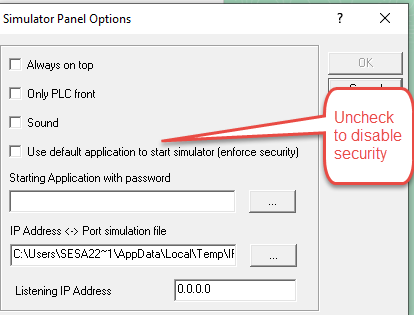
The PLC Simulator Option Panel has a new check box.
“Use default application to start simulator (enforce security)”
A field is provided for the password protected application’s path.
If the option is unchecked, a message is displayed to inform the user that the PLC simulator’s
use of port 502 is not secured.
The PLC simulator forbids uploading an application in monitor mode. (option is greyed out).
Unity Pro PLC simulator Cyber Security:
A password protected application is necessary to enforce security on Ethernet port 502 of the computer
when PLC Simulator is started from Unity Pro (PLC → Connect). This is the default option.
(To open the simulator from Unity Pro, go to Start - Programs - Schneider Electric - Unity Pro - PLC Simulator. To open simulator from Control Expert, go to Start - Programs - EcoStruxure Control Expert - PLC Simulator.
The simulator will appear as a green box with a question mark inside.
Right click on this to open the panel.)
The PLC simulator only starts with a password protected application inside. (default)
The PLC Simulator Option Panel has a new check box.
“Use default application to start simulator (enforce security)”
A field is provided for the password protected application’s path.
If the option is unchecked, a message is displayed to inform the user that the PLC simulator’s
use of port 502 is not secured.
The PLC simulator forbids uploading an application in monitor mode. (option is greyed out).
If this FAQ did not solve your issue, you can chat with us at chat with us or e-mail us at customer.services@se.com to create a case with our Technical Support Team.
If you are not located in North America, please contact your local Customer Care Center for assistance:
Released for: Schneider Electric Macedonia
