


How can we help you today?
How to create a remote session on the HMIBSC via the Putty tool ?
Question
How to create a remote session on the HMIBSC via the Putty tool ?
Description
1- Install the Putty tool on your PC
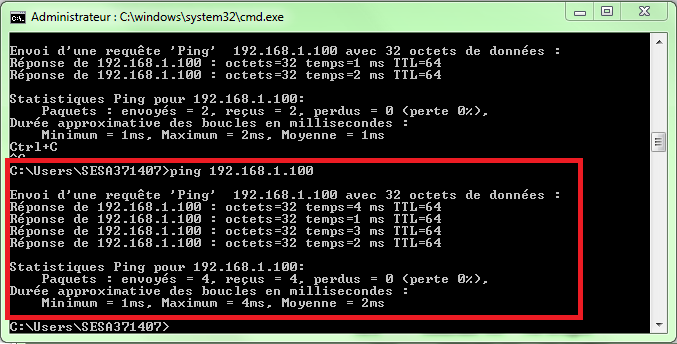
2- Check the connectivity with the HMIBSC target with the ping tool
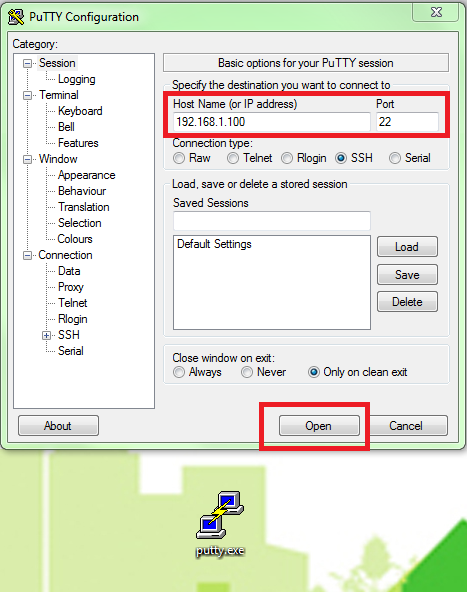
3- Configure and open the session with putty
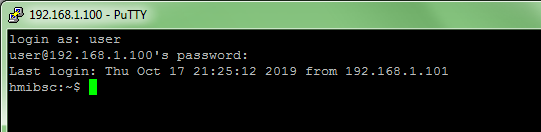
4- You can’t connect directly with the root account for security reasons.
You need to use a user account before ($ prefix).
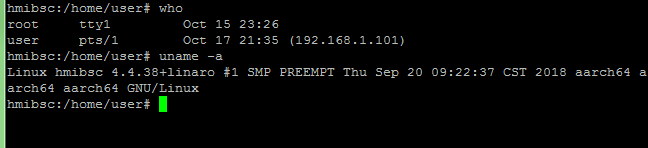
5- Now, it’s possible to login with the root account or to have the admin rights (# prefix)

6- You are connected on the HMIBSC
Keywords
HMIBSC, Magelis IIOT Box, Linux, SSH, remote session, Putty
Case author:
Lilian Cabos
Product Familly
Magelis IIOT Box
How to create a remote session on the HMIBSC via the Putty tool ?
Description
1- Install the Putty tool on your PC
2- Check the connectivity with the HMIBSC target with the ping tool
3- Configure and open the session with putty
4- You can’t connect directly with the root account for security reasons.
You need to use a user account before ($ prefix).
5- Now, it’s possible to login with the root account or to have the admin rights (# prefix)
6- You are connected on the HMIBSC
Keywords
HMIBSC, Magelis IIOT Box, Linux, SSH, remote session, Putty
Case author:
Lilian Cabos
Product Familly
Magelis IIOT Box
Released for: Schneider Electric Macedonia
Explore more
Range:

Explore more
Range:
Need help?
Get a Quote
Start your sales enquiry online and an expert will connect with you.
Where to buy?
Easily find the nearest Schneider Electric distributor in your location.
Help Centre
Find support resources for all your needs, in one place.