


How can we help you today?
Java web page on the TCSEGDB23F24FA Modbus Plus Gateway fails to open.
Opening the JAVA web pages for the 'TCSEGDB23F24FA Modbus Plus Proxy Gateway' module fails to open. This used to work but now returns a JAVA spinning icon.
The Java web page on the TCSEGDB23F24FA Modbus Plus Gateway will fail to open if the following 'Windows Security' pop up window does not appear.
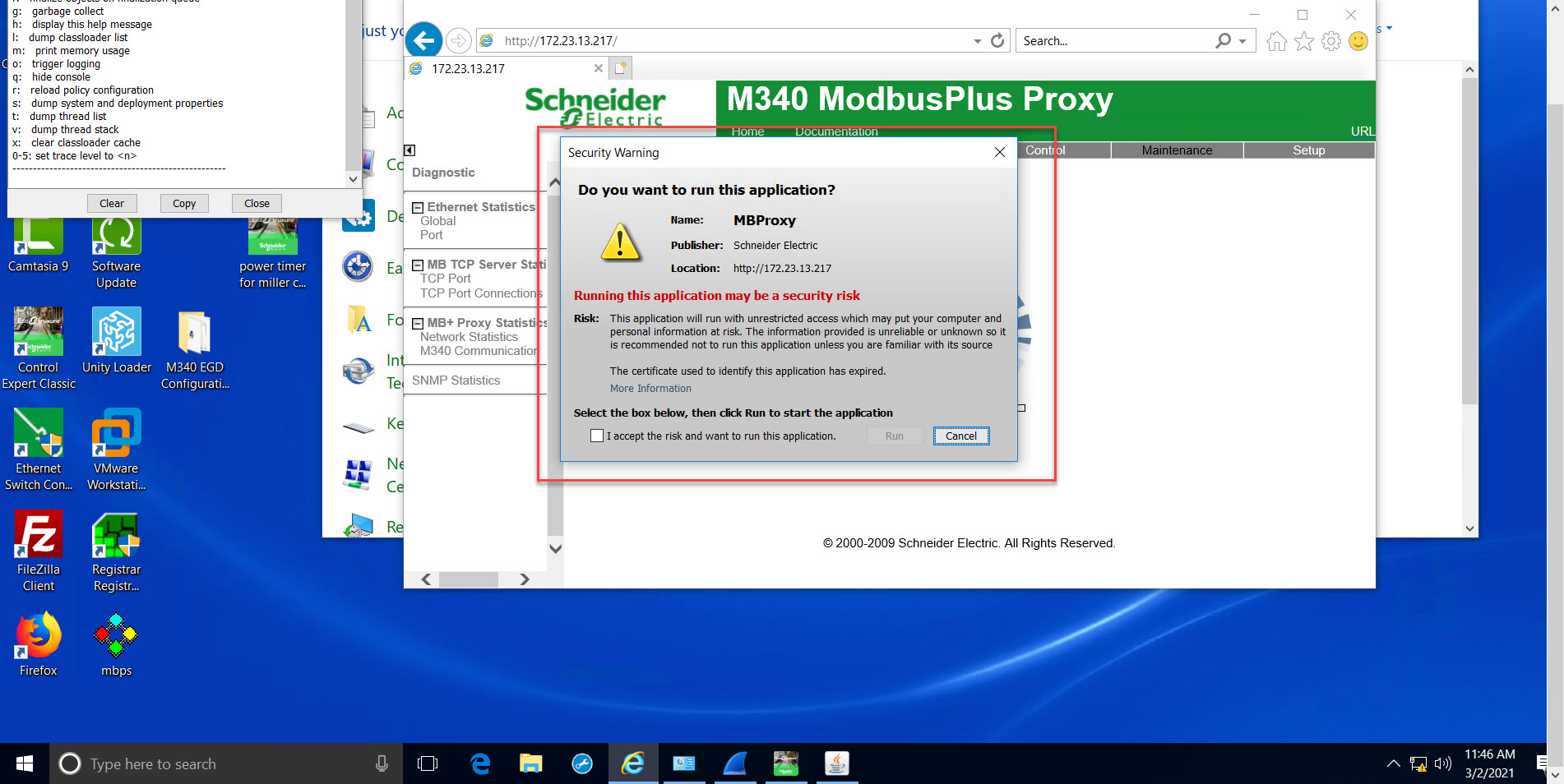
To resolve the issue, restore the security prompts using the following steps.
The Java web page on the TCSEGDB23F24FA Modbus Plus Gateway will fail to open if the following 'Windows Security' pop up window does not appear.
To resolve the issue, restore the security prompts using the following steps.
- Open the JAVA control panel.
- Click on 'Security'.
- Click on the button named 'Restore Security Prompts'.
Released for: Schneider Electric Malaysia
Explore more
Product:

Explore more
Product:
Need help?
Product Selector
Quickly and easily find the right products and accessories for your applications.
Get a Quote
Start your sales enquiry online and an expert will connect with you.
Where to buy?
Easily find the nearest Schneider Electric distributor in your location.
Help Centre
Find support resources for all your needs, in one place.