


How can we help you today?
Cannot open Data Model Manager for MiCOM S1 Studio Version 5.1 or 5.3.
Issue
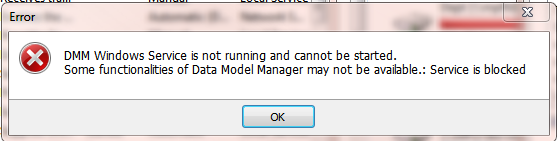
When trying to open MiCOM S1 Studio version 5.1 or 5.3 Data Model Manager the below error appears:
Product Line
MiCOM S1 Studio version 5.1 and 5.3
Environment
Data Model Manager for MiCOM S1 Studio
Causes
Customer's permissions on the computer are causing the service from starting or checking the status of the service SEDMMWinService.
Resolution
Version 5.1 follow the pdf called Instructions to collect details on Data Model Manager startup issue in MiCOM S1 Studio V5.1.0.pdf. If the issue is still present follow the document named 'Data Model Manager Error.pdf'.
Version 5.3 just follow the document called 'Data Model Manager Error.pdf'.
When trying to open MiCOM S1 Studio version 5.1 or 5.3 Data Model Manager the below error appears:
Product Line
MiCOM S1 Studio version 5.1 and 5.3
Environment
Data Model Manager for MiCOM S1 Studio
Causes
Customer's permissions on the computer are causing the service from starting or checking the status of the service SEDMMWinService.
Resolution
Version 5.1 follow the pdf called Instructions to collect details on Data Model Manager startup issue in MiCOM S1 Studio V5.1.0.pdf. If the issue is still present follow the document named 'Data Model Manager Error.pdf'.
Version 5.3 just follow the document called 'Data Model Manager Error.pdf'.
Released for: Schneider Electric Nigeria
Attachment(s)
Explore more
Range:

Explore more
Range:
Need help?
Product Selector
Quickly and easily find the right products and accessories for your applications.
Get a Quote
Start your sales enquiry online and an expert will connect with you.
Where to buy?
Easily find the nearest Schneider Electric distributor in your location.
Help Centre
Find support resources for all your needs, in one place.