


WR4200 configuration tool Wireless Receiver Setup v9.06 Microsoft. NET Framework deadlock issue
Cause:
1. Key Observations:
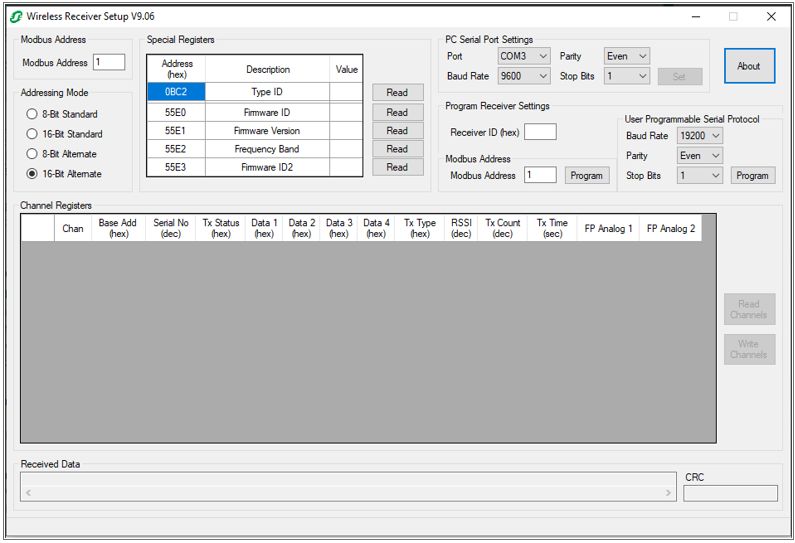
- Field installation WR4200 configuration tool Wireless Receiver Setup v9.06 on Microsoft Windows 10 pc.
- Windows error message
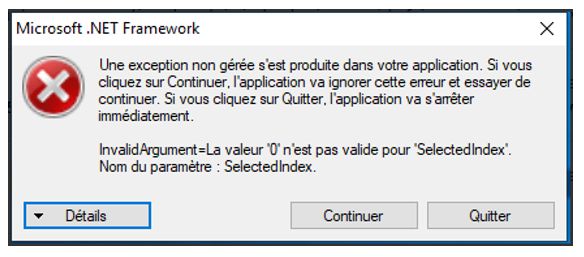
- The issue has been reproduce in any windows 10 installation.
Proposed Solution
We need do the following
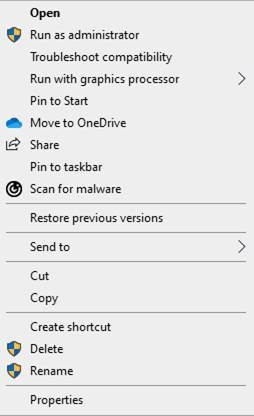
- locate the Schneider software folder on his PC, right click on the Schneider Wireless Receiver Setup.exe -

- At the next screen select 'Properties'
- Select the 'Compatibility' tab, then Tick the box 'Run this program as Administrator' Select 'Apply' and 'OK'
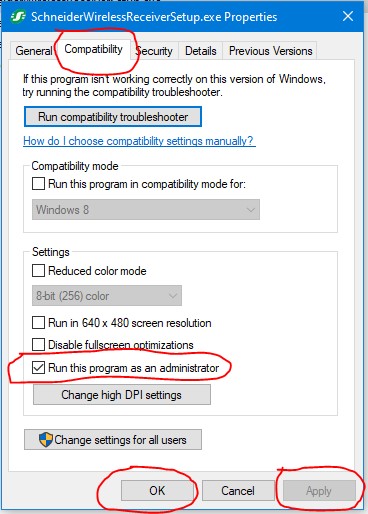
This will allow the missing .ini settings file to be released into the folder. The software should then run normally
1. Key Observations:
- Field installation WR4200 configuration tool Wireless Receiver Setup v9.06 on Microsoft Windows 10 pc.
- Windows error message

- The issue has been reproduce in any windows 10 installation.
Proposed Solution
We need do the following
- locate the Schneider software folder on his PC, right click on the Schneider Wireless Receiver Setup.exe -
- At the next screen select 'Properties'
- Select the 'Compatibility' tab, then Tick the box 'Run this program as Administrator' Select 'Apply' and 'OK'
This will allow the missing .ini settings file to be released into the folder. The software should then run normally
Released for: Schneider Electric Nigeria
