


How can we help you today?
How to change the size of the popup window in Vijeo Designer?
Issue:
To show customers how to change the size of a pop up window in Vijeo Designer.
Product Line:
Vijeo Designer
Resolution:
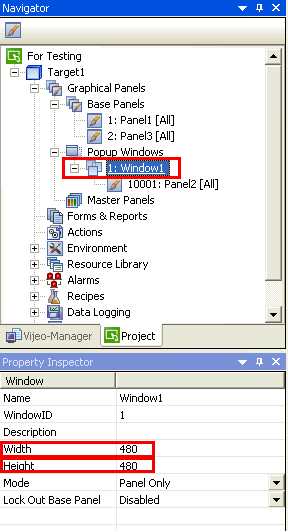
Once you have added a new popup window. Highlight the Window node and go to the Property Inspector Window
(see illustration below). You will see the width and height settings for that particular Popup Panel. You can have a
maximum of 800 pixels for the width and 600 for the height.
To show customers how to change the size of a pop up window in Vijeo Designer.
Product Line:
Vijeo Designer
Resolution:
Once you have added a new popup window. Highlight the Window node and go to the Property Inspector Window
(see illustration below). You will see the width and height settings for that particular Popup Panel. You can have a
maximum of 800 pixels for the width and 600 for the height.
Released for: Schneider Electric Philippines
Explore more
Range:

Explore more
Range:
Need help?
Product Selector
Quickly and easily find the right products and accessories for your applications.
Get a Quote
Start your sales inquiry online and an expert will connect with you.
Where to buy?
Easily find the nearest Schneider Electric distributor in your location.
Help Center
Find support resources for all your needs, in one place.