


How to perform a master reset on the COM'X 200 / COM'X 210 / COM'X 510
Issue:
A user may not know how to reset the COM'X 200, COM'X 210 or COM'X 510 to its default factory settings.
Product Line:
COM'X 200, COM'X 210
EBX200, COM'X 510
Environment:
Factory reset on the COM'X 200, COM'X 210 and COM'X 510
Cause:
There may be a need to reset a COM'X to the default factory settings.
Resolution:
Note: When following the procedure below, all data and logs that have been stored are erased.
To reset the Com'X completely, follow this procedure to set all configuration settings to factory values: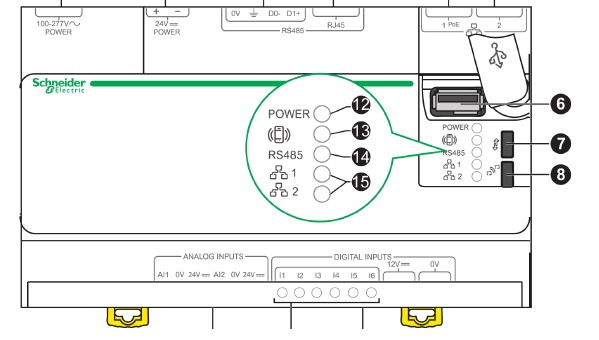
A user may not know how to reset the COM'X 200, COM'X 210 or COM'X 510 to its default factory settings.
Product Line:
COM'X 200, COM'X 210
EBX200, COM'X 510
Environment:
Factory reset on the COM'X 200, COM'X 210 and COM'X 510
Cause:
There may be a need to reset a COM'X to the default factory settings.
Resolution:
| NOTICE |
| HAZARD OF IP ADDRESS CONFLICT Disconnect the Com'X from any Ethernet networks before resetting the IP settings to factory values. Failure to follow these instructions can result in impaired communications. |
Note: When following the procedure below, all data and logs that have been stored are erased.
To reset the Com'X completely, follow this procedure to set all configuration settings to factory values:
- Turn off the Com'X by disconnecting the control power and wait until the power LED is off.
- Press simultaneously the Backup button (7) and Wi-Fi button (8) on the Com'X front face and turn on the Com'X. Hold the buttons for at least 10 seconds until the power LED flashes three times.
- Release the buttons. The Com'X reboots.
- Wait for the Com'X to restart completely. The power LED is:
- orange when the Com'X is starting.
- green when the Com'X has been reset to factory settings and is ready to be configured.
Released for: Schneider Electric Philippines
