


Why is my STRING type variable showing the data backwards in EcoStruxure Operator Terminal Expert?
Issue:
Whenever a STRING type is read from the PLC, the string that is displayed on the screen is backwards.
Product Line:
EcoStruxure Operator Terminal Expert
Resolution:
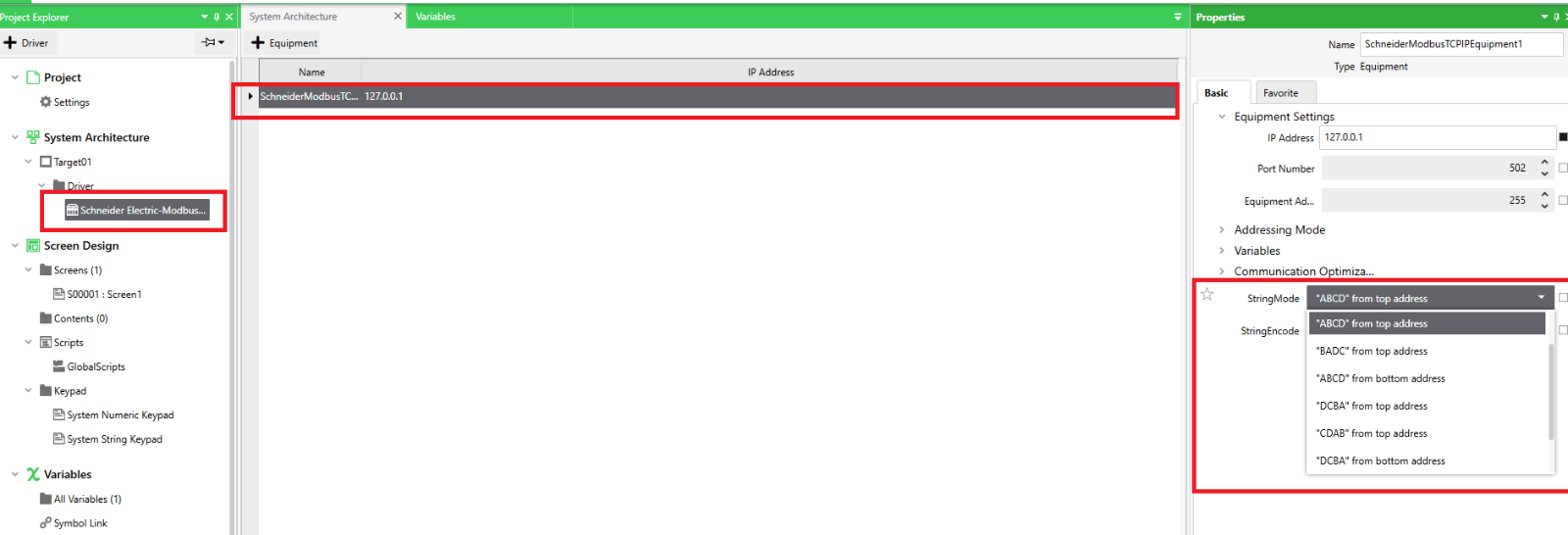
In EcoStruxure Operator Terminal Expert, there are specific driver settings that can help specify which order STRING type variables can show their data. The settings are found under the property "String Mode". The options are essentially Low Byte first or High Byte first. Please see the screen shot for the possible combinations. It is important to set the appropriate setting to ensure that your STRING type variables display the data properly from the PLC.
Whenever a STRING type is read from the PLC, the string that is displayed on the screen is backwards.
Product Line:
EcoStruxure Operator Terminal Expert
Resolution:
In EcoStruxure Operator Terminal Expert, there are specific driver settings that can help specify which order STRING type variables can show their data. The settings are found under the property "String Mode". The options are essentially Low Byte first or High Byte first. Please see the screen shot for the possible combinations. It is important to set the appropriate setting to ensure that your STRING type variables display the data properly from the PLC.
Released for: Schneider Electric Philippines

