


How to configure Modbus RTU on ASCO 5210 Power Meter
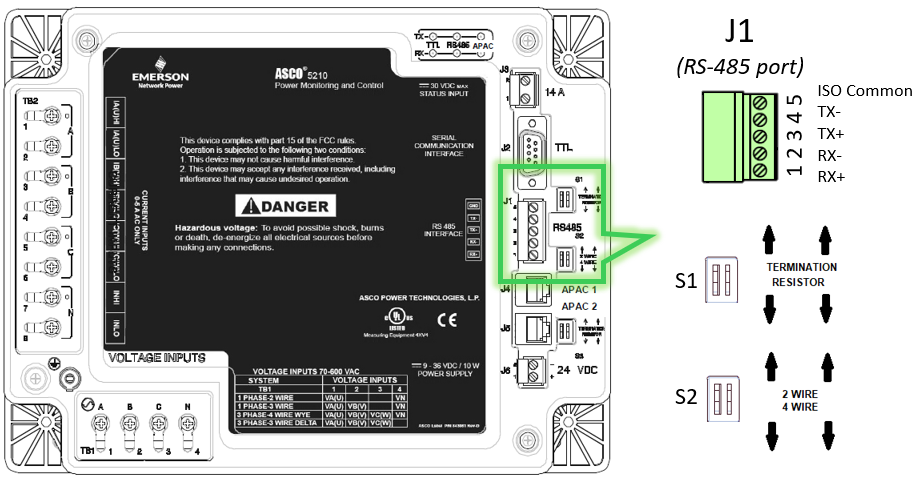
RS-485 Port and DIP SW Settings
1. On J1, terminate twisted pair cable.
2. Set proper termination for S1 (Terminating resistor).
2.1 Terminating resistor should be ON if 5210 is the last device on the loop.
2.2 Otherwise, it should be OFF.
3. Choose 2-wire or 4-wire (S2).
3.1. For 2-wire, connect on any + or - terminals. Moving the DIP SW will internally connect the terminal. No need for external jumper.
Serial Communication Settings on ASCO 5210 Power Meter
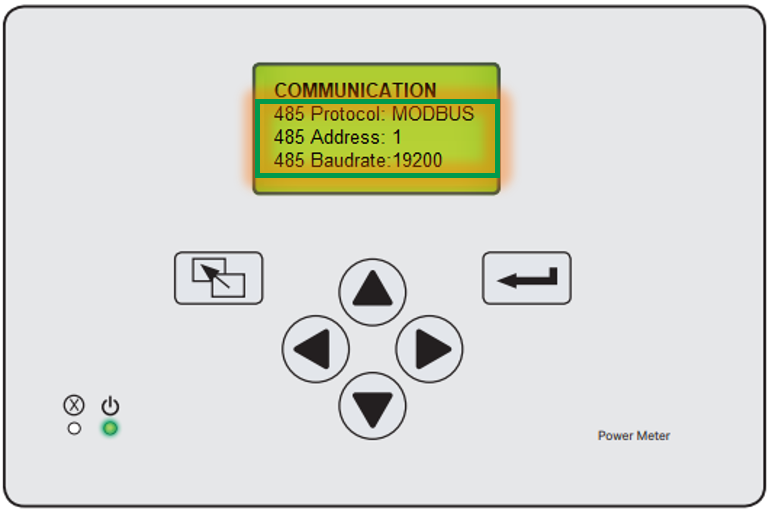
4. On 5210 PM, go to Main Menu ➡ Settings ➡ Communication ➡ 485 Protocol..
5. Set protocol to Modbus.
6. Set appropriate baud rate and device address.
Please refer to the attached Power Meter Modus Register Map document (381339-307D ) for holding register addresses.
You may also refer to the related video below for further information:
1. On J1, terminate twisted pair cable.
2. Set proper termination for S1 (Terminating resistor).
2.1 Terminating resistor should be ON if 5210 is the last device on the loop.
2.2 Otherwise, it should be OFF.
3. Choose 2-wire or 4-wire (S2).
3.1. For 2-wire, connect on any + or - terminals. Moving the DIP SW will internally connect the terminal. No need for external jumper.
Serial Communication Settings on ASCO 5210 Power Meter
4. On 5210 PM, go to Main Menu ➡ Settings ➡ Communication ➡ 485 Protocol..
5. Set protocol to Modbus.
6. Set appropriate baud rate and device address.
Please refer to the attached Power Meter Modus Register Map document (381339-307D ) for holding register addresses.
You may also refer to the related video below for further information:
Released for: Schneider Electric Philippines


Need help?
Product Selector
Quickly and easily find the right products and accessories for your applications.
Get a Quote
Start your sales inquiry online and an expert will connect with you.
Where to buy?
Easily find the nearest Schneider Electric distributor in your location.
Help Center
Find support resources for all your needs, in one place.