


Uniflair Manual Start Up and Shut Down (PCO1)
Issue:
Uniflair Manual Start Up and Shut Down (PCO1)
Product line:
TDCVXXXX, TUCVXXXX
Environment:
All Serial Numbers
Cause:
Install/Repair
Resolution:
Start Up the Unit
1. Unlock the main switch.
2. Open the door and remove the closer panel if necessary.
3. Remove the metal screen from the electrical panel using a screwdriver.
4. Position all of the circuit breakers on the electrical board to “I” (on).

5. Install the cover metal sheet to the electrical panel and secure with the screws.
6. Verify all traps are pre-charged with water and all system pipes have been bled of air.
7. For internal pipe, it is necessary to remove the frontal security metal sheet.
8. Close the door and the front panels.
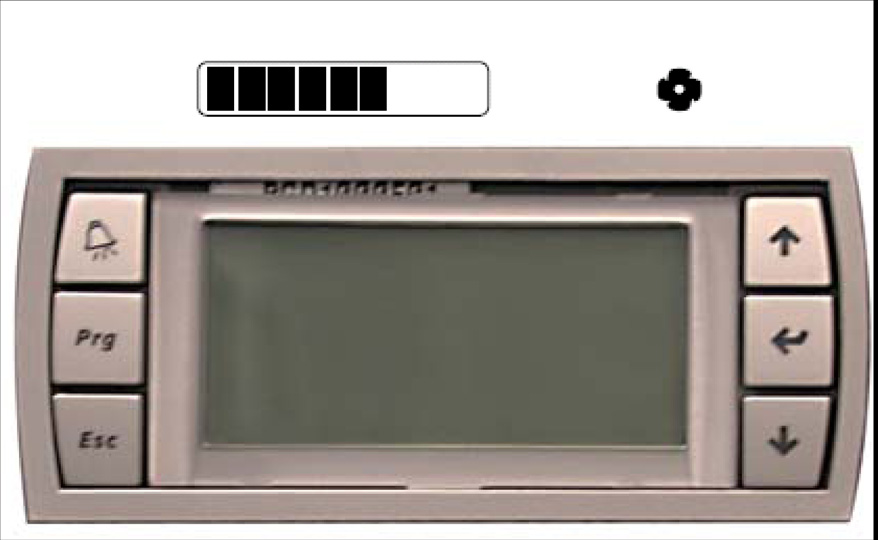
9. On the user interface, press the ENTER button. A sliding bar and a ventilator icon will appear on the display. If an alarm is indicated, consult the Uniflair Chilled Water and Direct Expansion Operation and Maintenance manual.
Turn Off the Unit
1. On the first user interface screen, press the UP or DOWN buttons until the SWITCH OFF UNIT screen appears.
2. Press the ENTER button. The following icons will appear.
3. Press the ENTER button.

For additional information, see the Uniflair Chilled Water and Direct Expansion Operation and Maintenance manual.
Uniflair Manual Start Up and Shut Down (PCO1)
Product line:
TDCVXXXX, TUCVXXXX
Environment:
All Serial Numbers
Cause:
Install/Repair
Resolution:
Start Up the Unit
1. Unlock the main switch.
2. Open the door and remove the closer panel if necessary.
3. Remove the metal screen from the electrical panel using a screwdriver.
4. Position all of the circuit breakers on the electrical board to “I” (on).
5. Install the cover metal sheet to the electrical panel and secure with the screws.
6. Verify all traps are pre-charged with water and all system pipes have been bled of air.
7. For internal pipe, it is necessary to remove the frontal security metal sheet.
8. Close the door and the front panels.
9. On the user interface, press the ENTER button. A sliding bar and a ventilator icon will appear on the display. If an alarm is indicated, consult the Uniflair Chilled Water and Direct Expansion Operation and Maintenance manual.
Turn Off the Unit
1. On the first user interface screen, press the UP or DOWN buttons until the SWITCH OFF UNIT screen appears.
2. Press the ENTER button. The following icons will appear.
3. Press the ENTER button.
For additional information, see the Uniflair Chilled Water and Direct Expansion Operation and Maintenance manual.