Onze merken

Impact-Company-Logo-English Black-01-177x54

Welkom op de website van Schneider Electric

Welkom op onze website.
		
Hoe kunnen wij u vandaag helpen?
Can the energy or demand values on a ION6200 be reset from the front panel?

Issue

User couldn't reset the Energy or Demand value on the ION6200

Product Line
ION6200

Environment
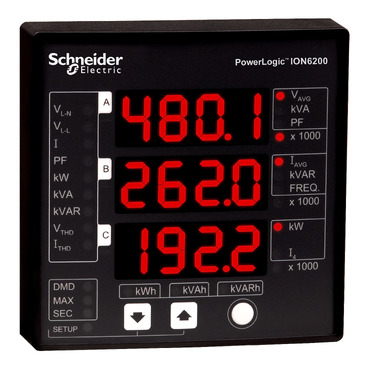
Front display of ION6200

Cause

Nothing as instruction wasn't found.


Resolution
For non-revenue sealed meters running firmware version v205 and later, the energy (kWh), peak current, and peak demand registers can be reset from the front panel.

  1. Press and hold the round button until Curr, PWr, and EnEr are displayed in the three lines
  • Curr: Current Maximum Demand Reset
  • PWr: Power Maximum Demand Reset
  • EnEr: Energy Reset
  1. Select the parameter to be reset and press the round button
  2. Confirm the reset and enter the front panel password
  3. Press and hold the round button to exit

For revenue sealed meters, energy and demand resets are not permitted.

Schneider Electric Belgium

Ontdek meer
Productfamilie
Ontdek meer
Productfamilie
  • Productdocumentatie
  • Software & firmware
  • Productselector
  • Productvervanging
  • Help- en Contact Center
  • Vind onze kantoren
  • Offerte aanvragen?
  • Verkooppunten
  • Schneider Electric Community
  • Werken bij
  • Bedrijfsprofiel
  • Wangedrag melden
  • Toegankelijkheid
  • Newsroom
  • Investeerders
  • EcoStruxure
  • Vacature zoeken
  • Blog
  • Als eerste op de hoogte nieuws?
  • Privacybeleid
  • Cookieverklaring
  • Gebruiksvoorwaarden
  • Algemene verkoop- en inkoopvoorwaarden
  • Change your cookie settings