


How to setup the ATV61 or ATV71 HMI keypad to monitor two parameters other than frequency reference in hertz on the display screen?
Issue:
How to setup the HMI keypad to monitor parameters other than frequency in hertz on the display screen.
Product Line:
ATV61/71 Drives
Environment:
All serial numbers for ATV61/71 Drives
Cause:
N/A
Resolution:
To setup the HMI keypad to display parameters other than frequency in the displays screen follow these steps:
1. In the main menu go to Menu 6 Monitoring Configuration.
2. In the Monitoring Configuration Menu go to Menu 6.2 Monitor Screen Type: Example Digital.
3. Then go to Parameter Selection.
4. You can now choose up to 2 parameters.
Note: These parameters will be shown on the screen before the Main Menu.
Only 2 parameters can be choosing at a time.
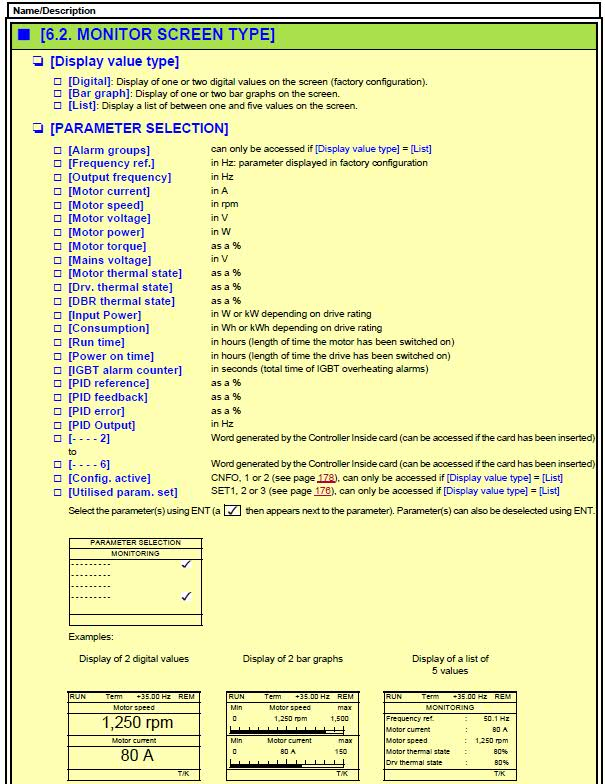
How to setup the HMI keypad to monitor parameters other than frequency in hertz on the display screen.
Product Line:
ATV61/71 Drives
Environment:
All serial numbers for ATV61/71 Drives
Cause:
N/A
Resolution:
To setup the HMI keypad to display parameters other than frequency in the displays screen follow these steps:
1. In the main menu go to Menu 6 Monitoring Configuration.
2. In the Monitoring Configuration Menu go to Menu 6.2 Monitor Screen Type: Example Digital.
3. Then go to Parameter Selection.
4. You can now choose up to 2 parameters.
Note: These parameters will be shown on the screen before the Main Menu.
Only 2 parameters can be choosing at a time.