.svg)
Issue
Cannot upload a pre configured CID/IID file to a MiCOM relay.
Product Line
MiCOM Relays
Environment
IEC61850 communications
Cause
MiCOM relays expects a MCL file for IEC61850 configuration settings.
Resolution
Unfortunately, a CID/IID file cannot be uploaded directly to a MiCOM relay. The CID/IID file needs to be converted into an MCL file before the configuration settings can be uploaded to the relay.
This can be done by following the below steps:
1. Depending on the version of IEC61850 edition being used select the appropriate configurator from Tools.

2. Once the configurator is open, go to File--> Import SCL
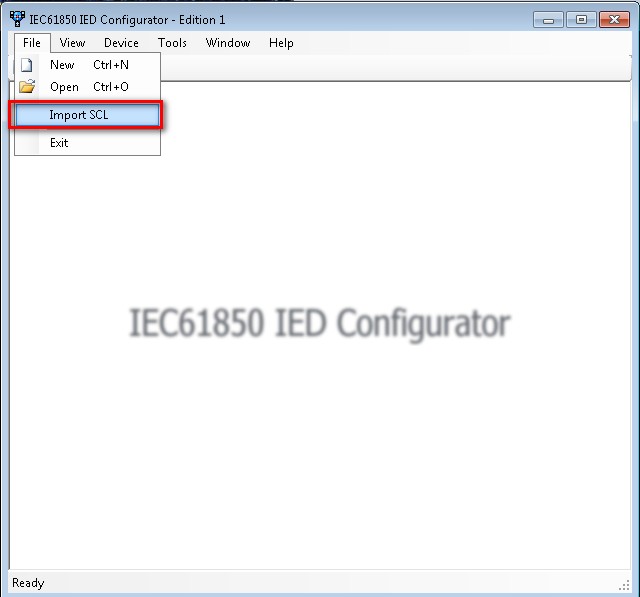
3. Select the appropriate SCD/CID/IID file that needs to be converted.

4. Open the SCD/CID/IID and then go to File--> Save.


Cannot upload a pre configured CID/IID file to a MiCOM relay.
Product Line
MiCOM Relays
Environment
IEC61850 communications
Cause
MiCOM relays expects a MCL file for IEC61850 configuration settings.
Resolution
Unfortunately, a CID/IID file cannot be uploaded directly to a MiCOM relay. The CID/IID file needs to be converted into an MCL file before the configuration settings can be uploaded to the relay.
This can be done by following the below steps:
1. Depending on the version of IEC61850 edition being used select the appropriate configurator from Tools.
2. Once the configurator is open, go to File--> Import SCL
3. Select the appropriate SCD/CID/IID file that needs to be converted.
4. Open the SCD/CID/IID and then go to File--> Save.
