


How to Change the Option Module Communication Issue Reset Behavior in the PM8000/ION7400/ION9000 series?
Issue
How to change the default behavior of the PM8000/ION7400/ION9000 options module bus to not automatically reset on an error.
Product
PM8000 series
ION7400 series
ION9000 series
Environment
ION Setup
Resolution
The default behavior is to reset the bus automatically on an error. The steps below can be used to change this behavior.
NOTE: Changing this behavior will require a user to manually reset the bus when a communication error occurs.
The reset can be performed via the front panel, web pages or by pulsing the option module reset the external Boolean module.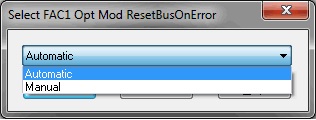
* Refer to the ION Setup User guide for more information 7EN02-0312-00
How to change the default behavior of the PM8000/ION7400/ION9000 options module bus to not automatically reset on an error.
Product
PM8000 series
ION7400 series
ION9000 series
Environment
ION Setup
Resolution
The default behavior is to reset the bus automatically on an error. The steps below can be used to change this behavior.
NOTE: Changing this behavior will require a user to manually reset the bus when a communication error occurs.
The reset can be performed via the front panel, web pages or by pulsing the option module reset the external Boolean module.
- Connect to the meter using ION Setup. *
- Set the meter to advanced configuration mode. *
- Open the Factory Module folder and open the FAC1 module.
- Change the Opt Mod ResetBusOnError setup register from Automatic to manual.
- Send changes to the meter and disconnect from ION Setup.
* Refer to the ION Setup User guide for more information 7EN02-0312-00