


Hoe kunnen wij u vandaag helpen?
How to solve the Unity Pro V11.1 installation problem when the "Unity Pro Ethernet Configuration Tool" CDROM source request occurs.
Trying to install Unity 11.1, if the "Ethernet Configuration Tool" CDROM tool is requested:
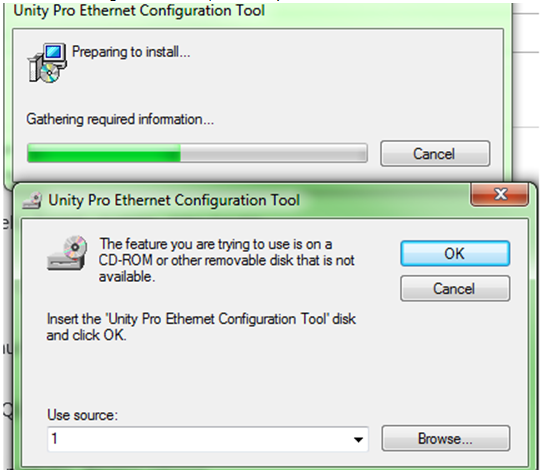
That means the installation process does find the original installation ressource about Unity pro ethernet configuration tool.
Two ways are possible to solve this problem:
- Try to manually uninstall (via the control panel, add/remove program) the "Unity Pro Ethernet configuration tool" and "Unity Pro PlantStructure DTM Library".
If the problem is the same,
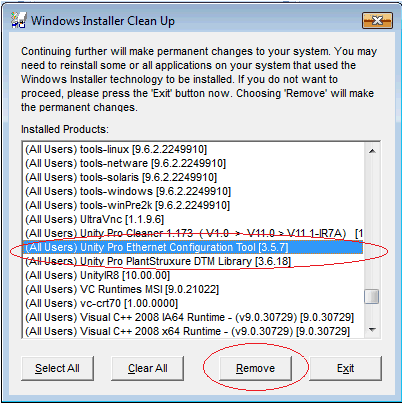
- Use the free tool msicuu2.exe (attached) to force the "Unity Pro Ethernet configuration tool" and "Unity Pro PlantStructure DTM Library" uninstallation:
That means the installation process does find the original installation ressource about Unity pro ethernet configuration tool.
Two ways are possible to solve this problem:
- Try to manually uninstall (via the control panel, add/remove program) the "Unity Pro Ethernet configuration tool" and "Unity Pro PlantStructure DTM Library".
If the problem is the same,
- Use the free tool msicuu2.exe (attached) to force the "Unity Pro Ethernet configuration tool" and "Unity Pro PlantStructure DTM Library" uninstallation:
Gepubliceerd voor: Schneider Electric Belgium
bijlage(n)
Ontdek meer
Productfamilie
Ontdek meer
Productfamilie
Hulp nodig?
Selecteer zelf het juiste product
Vind snel en eenvoudig de juiste producten en toebehoren voor uw toepassingen.
Offerte aanvragen
Dien uw aanvraag online in en een expert zal contact met u opnemen.
Verkooppunten
Vind eenvoudig de dichtstbijzijnde distributeur van Schneider Electric op uw locatie.
Help Center
Vind de antwoorden die u nodig heeft via bladeren door veelgestelde vragen over onderwerpen.