.svg)
Issue:
Configuring Sink Mode on Altivar 61 & 71 Drives.
Product Line:
Altivar 61
Altivar 71
Environment:
All
Cause:
Terminal control mode configuration
Resolution:
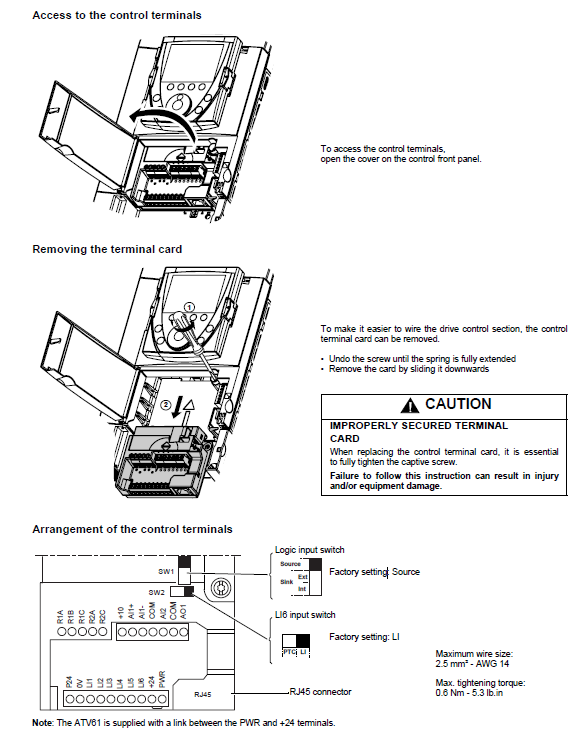
First, to get access to the control terminals, open the cover on the control front panel.
Undo the locking screw until the spring is full extended.
Remove the card by sliding it downwards.
Note the SW1 switch on the card.
Move the DIP switch accordingly.
Reseat the card back into its slot and re-tighten the locking screw.
Configuring Sink Mode on Altivar 61 & 71 Drives.
Product Line:
Altivar 61
Altivar 71
Environment:
All
Cause:
Terminal control mode configuration
Resolution:
First, to get access to the control terminals, open the cover on the control front panel.
Undo the locking screw until the spring is full extended.
Remove the card by sliding it downwards.
Note the SW1 switch on the card.
Move the DIP switch accordingly.
Reseat the card back into its slot and re-tighten the locking screw.
Gepubliceerd voor: Schneider Electric Belgium

