


IEC61850 configuration Tool returns the message 'Detected Error in Application'.
Issue
'IEC61850 Configuration Tool' returns 'Detected Error in Application' message.
Product Line
BMENOP0300
Environment
Unity, Windows 10
Resolution
Opening the IEC61850 Configuration Tool returns the message 'Detected Error in Application'.
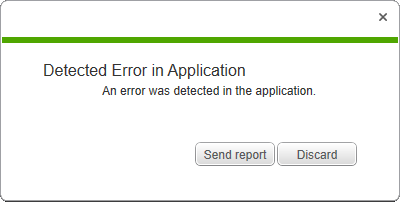
The reasons that this occurs could be due to the 'MongoDB' services are not running or they were not properly installed.
To verify that the service are running: 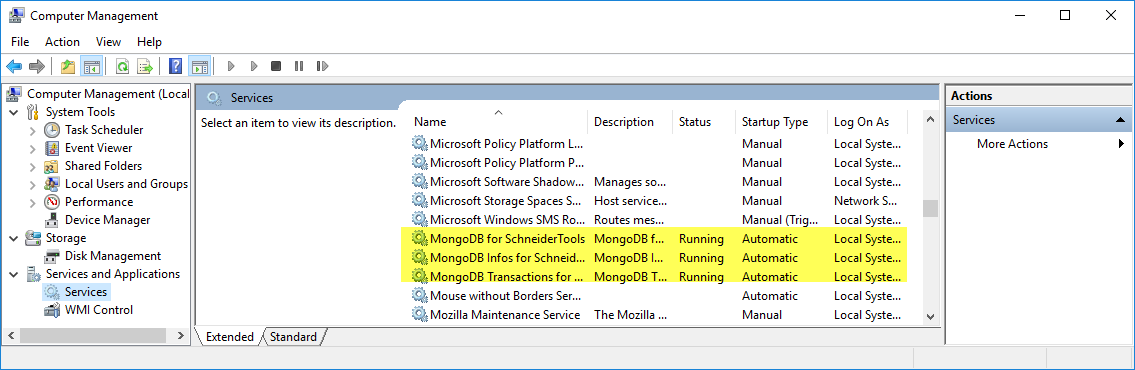
If the services are not running:
If the services are running:
If the issue still occurs, use the following steps to resolve the issue.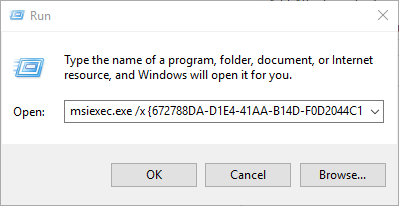
'IEC61850 Configuration Tool' returns 'Detected Error in Application' message.
Product Line
BMENOP0300
Environment
Unity, Windows 10
Resolution
Opening the IEC61850 Configuration Tool returns the message 'Detected Error in Application'.
The reasons that this occurs could be due to the 'MongoDB' services are not running or they were not properly installed.
To verify that the service are running:
- Open the 'Computer Management' console.
- Examine the status of the three (3) Mongo DB services:
- MongoDB for SchneiderTools.
- MongoDB Infos for SchneiderTools.
- MongoDB Transactions for SchneiderTools.
If the services are not running:
- Right click on the service name.
- Select 'Start '.
- Retest.
If the services are running:
- Check that it is not being blocked by either
- The firewall,
- Antivirus software,
- Antispyware software
- PC group policy
- Retest
If the issue still occurs, use the following steps to resolve the issue.
- Uninstall 'MongoDB 3.2.8 for SchneiderTools'
- Open the windows search bar.
- Copy the command 'msiexec.exe /x {672788DA-D1E4-41AA-B14D-F0D2044C1180}' and paste it to the Windows Run command text box.
- Click on OK.
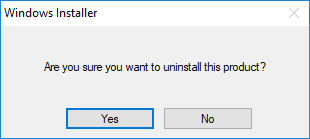
- Click on 'Yes' in the 'Windows Installer' window that appears.
- Reinstall 'MongoDB 3.2.8 for SchneiderTools' using the attached software named 'MongoDB 3.2.8 for SchneiderTools_1.0.9.0_RS_x64.msi.7z.
- Reinstall the IEC61850 Configuration Tool.
- Retest.