


Power Monitoring Expert v2020: Installation got struck while installing SE Floating License Manager (FLM)
Issue
While installing PME, it gets struck during installation of SE Floating License Manager (FLM).
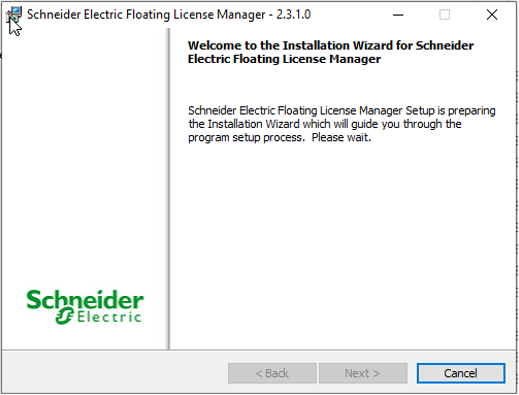
Notice in below screen-cap in the installation UI 'Next' button is not enabled.
Also observed below error in Windows event > Application logs
Faulting application name: MsiExec.exe, version: 5.0.19041.1, time stamp: 0x25d5450e
Faulting module name: ISRT.dll, version: 23.0.0.511, time stamp: 0x5906b3e0
Exception code: 0xc0000005
Fault offset: 0x00095dd2
Faulting process id: 0x37cc
Faulting application start time: 0x01d6dcfc3840fcb3
Faulting application path: C:\Windows\syswow64\MsiExec.exe
Faulting module path: C:\Users\admin\AppData\Local\Temp\{0F08BE00-6415-4AE9-94D5-B21737FD11EA}\ISRT.dll
Report Id: 1557ef67-20f8-4a57-928c-bc256ab096af
Environment
Power Monitoring Expert v9.0 / v2020
Cause
User Account Control (UAC) security policy settings restricting SE FLM installer to halt/struck.
Resolution
> Lower the windows UAC settings as per below screen cap.

OR
> If above step didn’t fix the issue then install 3rd party WinZip/WinRar application and see if it fixes the issue.
While installing PME, it gets struck during installation of SE Floating License Manager (FLM).
Notice in below screen-cap in the installation UI 'Next' button is not enabled.
Also observed below error in Windows event > Application logs
Faulting application name: MsiExec.exe, version: 5.0.19041.1, time stamp: 0x25d5450e
Faulting module name: ISRT.dll, version: 23.0.0.511, time stamp: 0x5906b3e0
Exception code: 0xc0000005
Fault offset: 0x00095dd2
Faulting process id: 0x37cc
Faulting application start time: 0x01d6dcfc3840fcb3
Faulting application path: C:\Windows\syswow64\MsiExec.exe
Faulting module path: C:\Users\admin\AppData\Local\Temp\{0F08BE00-6415-4AE9-94D5-B21737FD11EA}\ISRT.dll
Report Id: 1557ef67-20f8-4a57-928c-bc256ab096af
Environment
Power Monitoring Expert v9.0 / v2020
Cause
User Account Control (UAC) security policy settings restricting SE FLM installer to halt/struck.
Resolution
> Lower the windows UAC settings as per below screen cap.
OR
> If above step didn’t fix the issue then install 3rd party WinZip/WinRar application and see if it fixes the issue.