


Hoe kunnen wij u vandaag helpen?
How to modify the external project path for Vijeo Designer ?
The goal of this article is to explain how to modify the external project path for Vijeo Designer if it had been modified or is incorrect.
The article is applicable for Vijeo Designer v6.2 or more.
For example, it's possible to install Vijeo Designer software on a system disk (as C:\ ) and store the project on another disk (as D:\ )
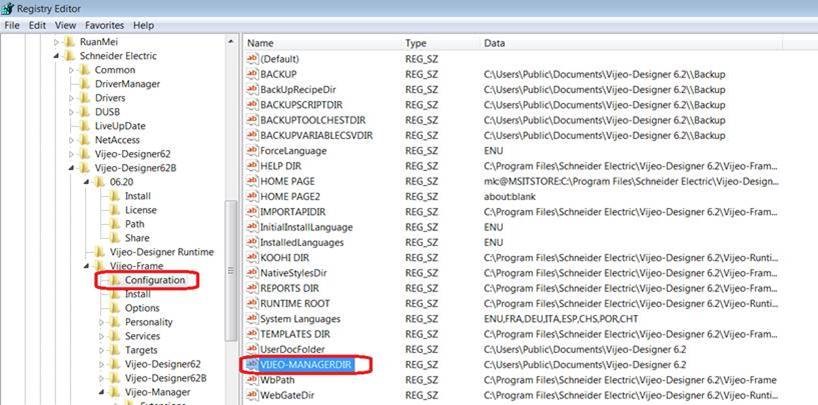
To modify paths, please use the regedit tool and modify 2 registry keys in the registry base :
The article is applicable for Vijeo Designer v6.2 or more.
For example, it's possible to install Vijeo Designer software on a system disk (as C:\ ) and store the project on another disk (as D:\ )
To modify paths, please use the regedit tool and modify 2 registry keys in the registry base :
- " Vijeo-frame -> Vijeo-Manager -> ROOTDIR "
- " Vijeo-frame -> Configuration -> VijeoManagerDir "
Gepubliceerd voor: Schneider Electric Belgium
Ontdek meer
Product:
Ontdek meer
Product:
Hulp nodig?
Selecteer zelf het juiste product
Vind snel en eenvoudig de juiste producten en toebehoren voor uw toepassingen.
Offerte aanvragen
Dien uw aanvraag online in en een expert zal contact met u opnemen.
Verkooppunten
Vind eenvoudig de dichtstbijzijnde distributeur van Schneider Electric op uw locatie.
Help Center
Vind de antwoorden die u nodig heeft via bladeren door veelgestelde vragen over onderwerpen.