Hoe kunnen wij u vandaag helpen?

Unable to install PLC-USB driver due to user conflict

Installing the 'SchneiderPLCUSBDriverSuite V14.15.0.0' returns the following error.:
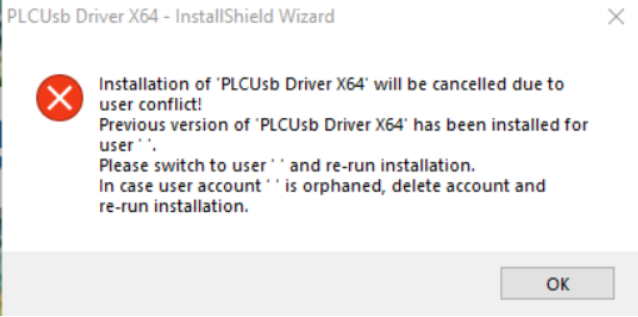
PLCUSB Driver

Use the following steps to run the ps1 file named 'Release-PerUserDrivers.ps1' can be used to resolve the issue.

  • Browse to the location you stored the ps1-file in File Explorer and choose; File-> Open Windows PowerShell.
  • Type (part of) the name of the script.
  • Press TAB to auto complete then name. Note: Do this even when you typed the name in full. ...
  • Press ENTER to execute the script.
Note: This doesn’t uninstall the old driver versions, but it deletes any 'SchneiderPLCUSBDriverSuite' installer related
registry keys that causes Windows to detect and refuse the install/uninstall of the driver components..

Schneider Electric Belgium

bijlage(n)
Release-PerUserDrivers.ps1.txt [16.07 KB]
Ontdek meer
Productfamilie
Ontdek meer
Productfamilie

Hulp nodig?

Hulp nodig?

Selecteer zelf het juiste product

Selecteer zelf het juiste product

Vind snel en eenvoudig de juiste producten en toebehoren voor uw toepassingen.

Offerte aanvragen

Offerte aanvragen

Dien uw aanvraag online in en een expert zal contact met u opnemen.

Verkooppunten

Verkooppunten

Vind eenvoudig de dichtstbijzijnde distributeur van Schneider Electric op uw locatie.

Help Center

Help Center

Vind de antwoorden die u nodig heeft via bladeren door veelgestelde vragen over onderwerpen.

  • Productdocumentatie
  • Software & firmware
  • Productselector
  • Productvervanging
  • Help- en Contact Center
  • Vind onze kantoren
  • Offerte aanvragen?
  • Verkooppunten
  • Schneider Electric Community
  • Werken bij
  • Bedrijfsprofiel
  • Wangedrag melden
  • Toegankelijkheid
  • Newsroom
  • Investeerders
  • EcoStruxure
  • Vacature zoeken
  • Blog
  • Als eerste op de hoogte nieuws?
  • Privacybeleid
  • Cookieverklaring
  • Gebruiksvoorwaarden
  • Algemene verkoop- en inkoopvoorwaarden
  • Change your cookie settings