


How to update the firmware of the Harmony STM6 Edge Box HMISTM6BOXIOT?
The goal of this FAQ is to explain how to update the firmware of the Harmony Edge Box HMI.
This article is applicable for HMISTM6BOXIOT.
To update the firmware of Harmony STM6 Edge Box HMI, need to follow some step (Last official update: V1.1.0).
Here the steps:
1 - Download the last software corresponding to the last official update: https://schneiderelectric.sharepoint.com/:f:/s/BoxSupportL3Group/EiO8SIa0xSVAgsXxTW6XbpEBgNU7lpMDlq0sEBs56UWWZg?e=RHI6zt
2 - Copy BOOTLD13.SYS and BOOTOS13.SYS to root of USB storage.
3 - Insert the USB flash disk in the USB port of HMISTM6BOXIOT.
4 - Connect to the configuration menu.
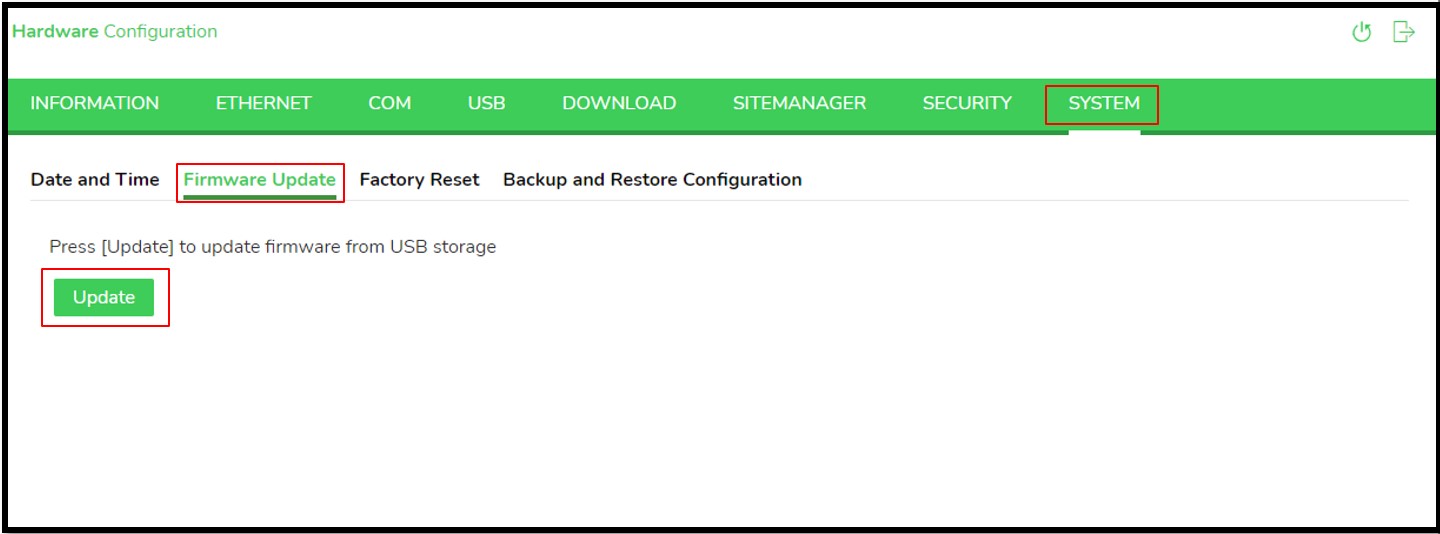
The duration to update the firmware is around 1 - 2 minutes.
After update the target will restart automatically.
This article is applicable for HMISTM6BOXIOT.
To update the firmware of Harmony STM6 Edge Box HMI, need to follow some step (Last official update: V1.1.0).
Here the steps:
1 - Download the last software corresponding to the last official update: https://schneiderelectric.sharepoint.com/:f:/s/BoxSupportL3Group/EiO8SIa0xSVAgsXxTW6XbpEBgNU7lpMDlq0sEBs56UWWZg?e=RHI6zt
2 - Copy BOOTLD13.SYS and BOOTOS13.SYS to root of USB storage.
3 - Insert the USB flash disk in the USB port of HMISTM6BOXIOT.
4 - Connect to the configuration menu.
The duration to update the firmware is around 1 - 2 minutes.
After update the target will restart automatically.
Gepubliceerd voor: Schneider Electric Belgium

Hulp nodig?
Selecteer zelf het juiste product
Vind snel en eenvoudig de juiste producten en toebehoren voor uw toepassingen.
Offerte aanvragen
Dien uw aanvraag online in en een expert zal contact met u opnemen.
Verkooppunten
Vind eenvoudig de dichtstbijzijnde distributeur van Schneider Electric op uw locatie.
Help Center
Vind de antwoorden die u nodig heeft via bladeren door veelgestelde vragen over onderwerpen.