Hoe kunnen wij u vandaag helpen?

Important setting to know from OPCUA Client ?

It’s important to know the following information when there is problem on the OPCUA protocol between the OPCUA client and the OPCUA Server:
We need to know:
  • Simple architecture of the whole system between OPCUA Client and Server and other Network connection
  • OPCUA Client: which SCADA, what is the OPCUA Stack (From OPC Foundation, Unified automation, …), How it is developped the OPCUA client (C#...)?
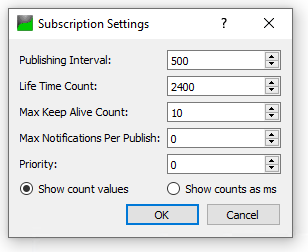
  • Subscription setting:
    • LifeTimeCount configured from OPCUA client
    • Publishing Interval configured from OPCUA client
    • Session Timeout configured from OPCUA client
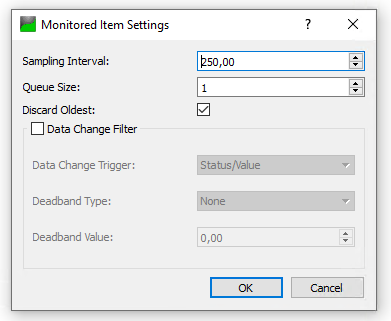
  • Monitored Item Setting
    • Sampling Interval configured from OPCUA client
  • Mast Cycle time of the PLC
Example from UaExpert :
  • Subscription setting:
subscription
  • Monitored Item Setting
Setting Monitoring Item

Schneider Electric Belgium

Ontdek meer
Product:
Productfamilie
Ontdek meer
Product:
Productfamilie

Hulp nodig?

Hulp nodig?

Selecteer zelf het juiste product

Selecteer zelf het juiste product

Vind snel en eenvoudig de juiste producten en toebehoren voor uw toepassingen.

Offerte aanvragen

Offerte aanvragen

Dien uw aanvraag online in en een expert zal contact met u opnemen.

Verkooppunten

Verkooppunten

Vind eenvoudig de dichtstbijzijnde distributeur van Schneider Electric op uw locatie.

Help Center

Help Center

Vind de antwoorden die u nodig heeft via bladeren door veelgestelde vragen over onderwerpen.

  • Productdocumentatie
  • Software & firmware
  • Productselector
  • Productvervanging
  • Help- en Contact Center
  • Vind onze kantoren
  • Offerte aanvragen?
  • Verkooppunten
  • Schneider Electric Community
  • Werken bij
  • Bedrijfsprofiel
  • Wangedrag melden
  • Toegankelijkheid
  • Newsroom
  • Investeerders
  • EcoStruxure
  • Vacature zoeken
  • Blog
  • Als eerste op de hoogte nieuws?
  • Privacybeleid
  • Cookieverklaring
  • Gebruiksvoorwaarden
  • Algemene verkoop- en inkoopvoorwaarden
  • Change your cookie settings