


Basic Diagnostic Information on SCADAPack x70 & Device Information File
SCADAPack x70 devices have a lot of diagnostic information available when using RemoteConnect. When online with a device and using RemoteConnect, a user can view many different diagnostics such as Status, Licensing, Logic and Objects.
Examples of some of the diagnostics available:
Status
To retrieve the Device Information file, a user needs to be connected to the x70 device and Online with RemoteConnect. The user should then right-click on the "SCADAPack x70 Controller Settings - Device DTM", then select "Additional Functions -> Get Device Information". The user will be prompted to select a folder on their computer and a name to save the file. It will be a .txt file.
This file contains all of the information listed above along with a more detailed view into the SCADAPack x70 operation and configuration. This will include (partial list) the following:
If you are contacting technical support about a x70 device, it is recommended to include this file.
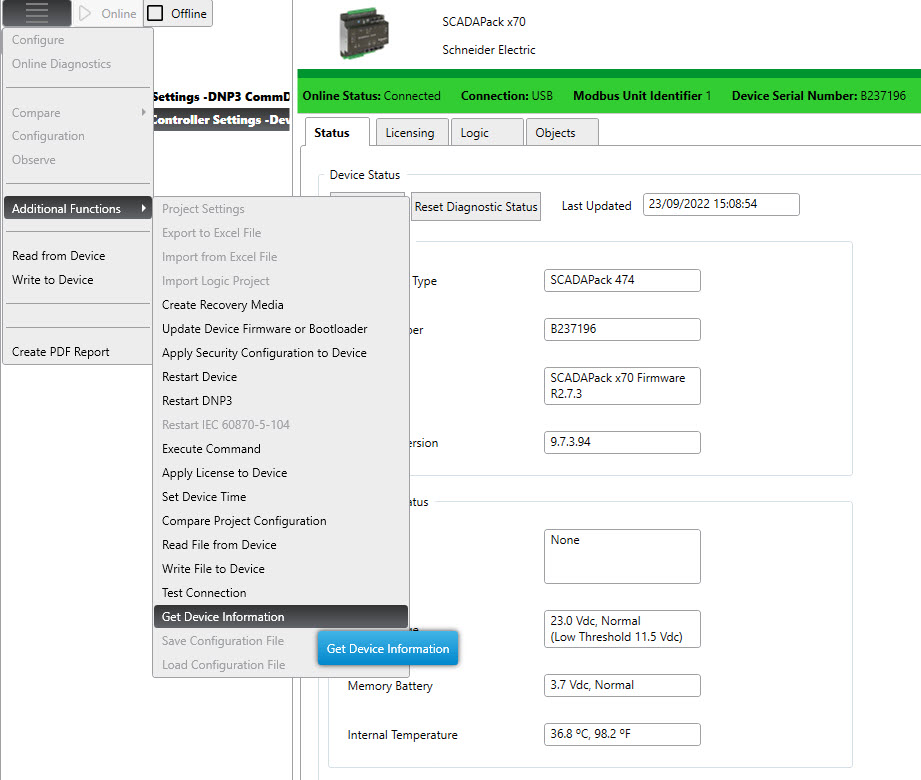
Examples of some of the diagnostics available:
Status
- Serial number
- Uptime
- Firmware Version
- Status Code
- RTC (Clock)
- Input Voltage
- Memory Battery
- Realflo Flow Runs
- Project Name
- Project Version
- Scan Times
- Logic Status
- Ability to view Objects individually or those Configured in Groups/Browsers
- System Data Groups/Browsers (that have not been configured)
- Data Logs Configured
- Graphing of Data Logs
To retrieve the Device Information file, a user needs to be connected to the x70 device and Online with RemoteConnect. The user should then right-click on the "SCADAPack x70 Controller Settings - Device DTM", then select "Additional Functions -> Get Device Information". The user will be prompted to select a folder on their computer and a name to save the file. It will be a .txt file.
This file contains all of the information listed above along with a more detailed view into the SCADAPack x70 operation and configuration. This will include (partial list) the following:
- DNP3 events
- Task Information
- IP Information
- DNP3 Associations
- Network Connections/Statistics
- Watchdogs
- Detailed Realflo flow run status
If you are contacting technical support about a x70 device, it is recommended to include this file.