


Why my OPC UA driver does not show under the Global Parameters?
Problem
The OPC UA driver does not show under the global parameters even when I installed the OPC UA Driver and the OPC UA prerequisites.
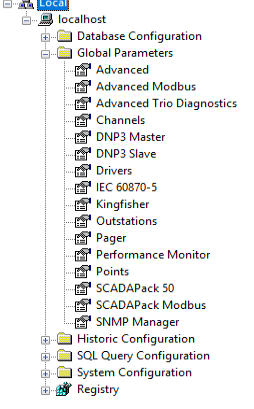
This issue can be fixed by installing the PCS Service and OPC UA server driver as follows:
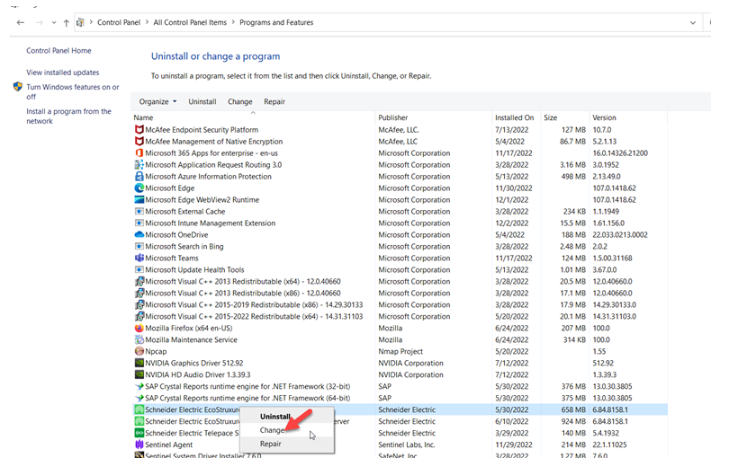
Run the installer and select change from the list.
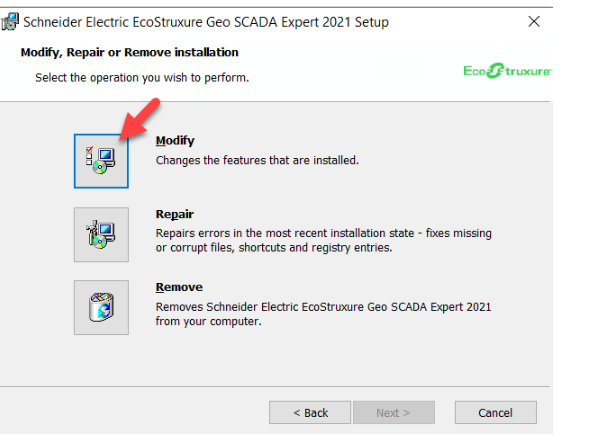
Select modify to make changes
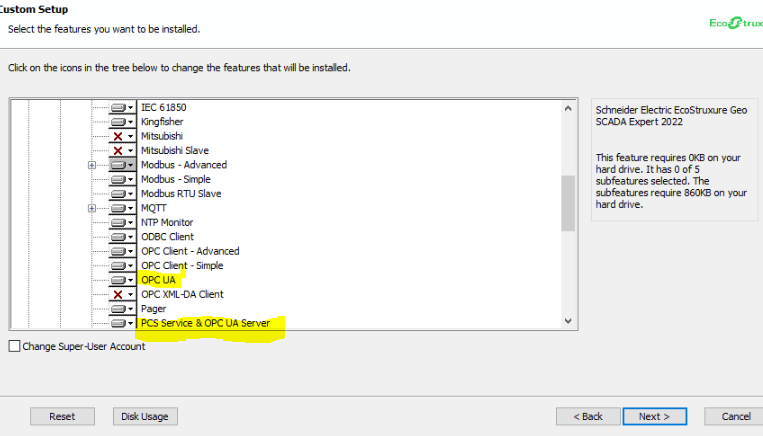
Select the PCS service and OPC UA server Driver along with the OPC UA Driver as indicated below.
Click install to start installation process.
Once the installation process is completed, click finish to exit.
Notice that the OPC UA driver now appears in the Global parameters.
The OPC UA driver does not show under the global parameters even when I installed the OPC UA Driver and the OPC UA prerequisites.
Solution
The PCS Service and OPC UA server Driver must be installed as well as the OPC UA driver and the OPC UA prerequisites.This issue can be fixed by installing the PCS Service and OPC UA server driver as follows:
Run the installer and select change from the list.
Select modify to make changes
Select the PCS service and OPC UA server Driver along with the OPC UA Driver as indicated below.
Click install to start installation process.
Once the installation process is completed, click finish to exit.
Notice that the OPC UA driver now appears in the Global parameters.