


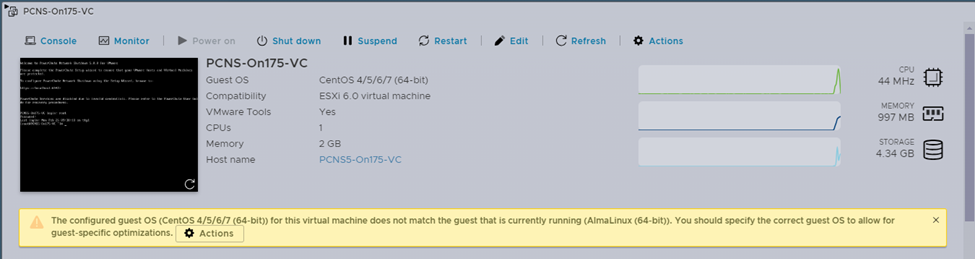
VMware ESXi host reports that the configured guest OS for the PowerChute virtual machine does not match the currently running OS.
Issue:
The VMware ESXi host reports that the configured guest OS for the PowerChute virtual machine does not match the currently running OS.
Product:
PowerChute Network Shutdown versions 4.4.x and 5.x
Environment:
VMware ESXi version 7 and above
Cause:
VMware ESXi host interpretation of the VMs OS.
Solution:
This warning is like an issue reported in VMware knowledge base document 67671. vCenter Server Appliance displays a warning message on ESXi Host Client (67671) (vmware.com ), but it can be ignored as it does not affect the operation of the PowerChute VM.
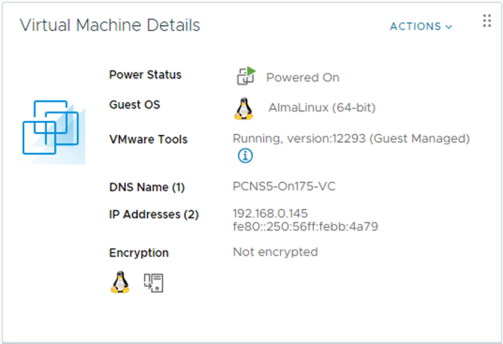
Note: When the same PowerChute VM is viewed through VMware vCenter Server, the OS is reported as AlmaLinux 64bit Linux.
The VMware ESXi host reports that the configured guest OS for the PowerChute virtual machine does not match the currently running OS.
Product:
PowerChute Network Shutdown versions 4.4.x and 5.x
Environment:
VMware ESXi version 7 and above
Cause:
VMware ESXi host interpretation of the VMs OS.
Solution:
This warning is like an issue reported in VMware knowledge base document 67671. vCenter Server Appliance displays a warning message on ESXi Host Client (67671) (vmware.com ), but it can be ignored as it does not affect the operation of the PowerChute VM.
Note: When the same PowerChute VM is viewed through VMware vCenter Server, the OS is reported as AlmaLinux 64bit Linux.