


Why OFS 3.63 SP3 shows “application can not be verified” when starting?
Question:
Why OFS 3.63 SP3 shows “application can not be verified” when starting?
Answer:
DigiCert has introduced the new cross root “DigiCert” Trusted Root G4” to resolve compatibility issues with legacy timestamp clients.
If up to OFS v3.63 SP2, the codesign embeds the “DigiCert Assured ID Root CA” and installed on all systems. OFS 3.63 SP3 embed the new DigiCert Trusted Root G4 root CA.
So any system installed before June 2022 and not (or incorrectly) updated will not embed this root CA and will cause the application startup to fail.
When checking the digital signature or executing the signed program on all Windows machines missing the new ICA “DigiCert Trusted Root G4” errors similar to “application can not be verified” may appear.
So, to resolve this the certificate must be installed manually.
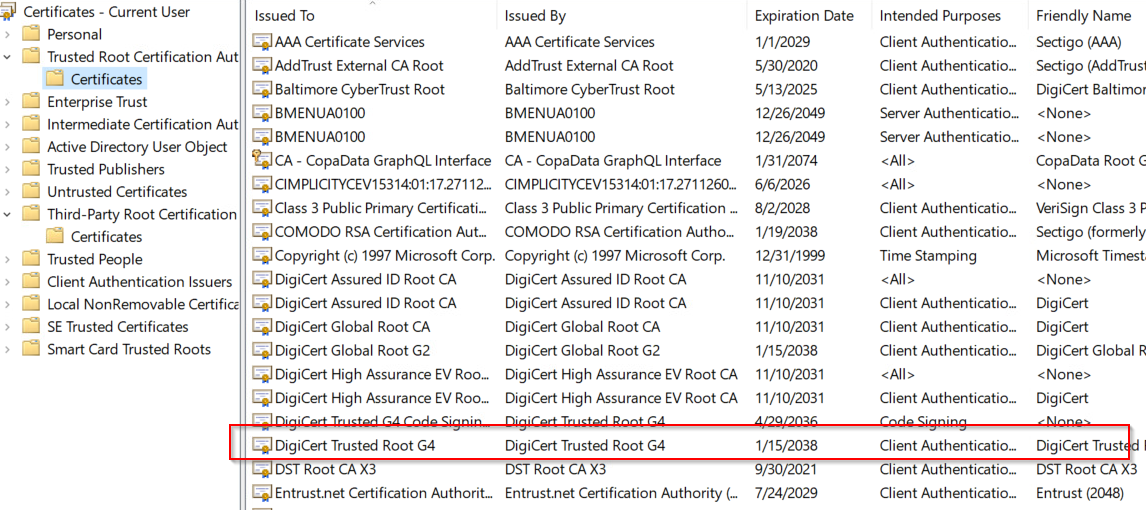
The certificate can be downloaded from this link provided by DigiCert.
https://knowledge.digicert.com/solution/authenticode-signature-verification-fails-with-new-timestamping-cross-root
Why OFS 3.63 SP3 shows “application can not be verified” when starting?
Answer:
DigiCert has introduced the new cross root “DigiCert” Trusted Root G4” to resolve compatibility issues with legacy timestamp clients.
If up to OFS v3.63 SP2, the codesign embeds the “DigiCert Assured ID Root CA” and installed on all systems. OFS 3.63 SP3 embed the new DigiCert Trusted Root G4 root CA.
So any system installed before June 2022 and not (or incorrectly) updated will not embed this root CA and will cause the application startup to fail.
When checking the digital signature or executing the signed program on all Windows machines missing the new ICA “DigiCert Trusted Root G4” errors similar to “application can not be verified” may appear.
So, to resolve this the certificate must be installed manually.
The certificate can be downloaded from this link provided by DigiCert.
https://knowledge.digicert.com/solution/authenticode-signature-verification-fails-with-new-timestamping-cross-root