


Video: How can you modify the number of backups retained in PME?
Issue
A user may want to modify the number of backups retained in PME
Product Line
Power Monitoring Expert 7.2
Power Monitoring Expert 8.x
Power Monitoring Expert 9.x
Power Monitoring Expert 2020
Power Monitoring Expert 2021
Power Monitoring Expert 2022
Power Monitoring Expert 2023
A user may want to modify the number of backups retained in PME
Product Line
Power Monitoring Expert 7.2
Power Monitoring Expert 8.x
Power Monitoring Expert 9.x
Power Monitoring Expert 2020
Power Monitoring Expert 2021
Power Monitoring Expert 2022
Power Monitoring Expert 2023
Power Monitoring Expert 2024
Environment
Windows Task Scheduler
Cause
In PME 7.2 and greater, scheduled tasks have been removed from the ION Database Manager and are now handled by the Windows Task Scheduler which invokes Windows PowerShell files to run the backup. The PowerShell file itself will need to be modified to change the number of backups.
Resolution
*Warning: Take backups of any files prior to modifying them. Ensure the backups are in a location that will not be overwritten (i.e. the Desktop).*
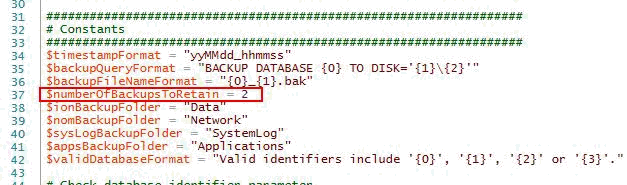
Navigate to the following directory < >\Power Monitoring Expert\config\cfg\DbScheduledTasks (may vary depending on the installation directory) and open the file "Backup.ps1" either with Windows PowerShell or Notepad and edit the code as shown below. The following example shows how to change the number of backups saved from two to three.
Original Code:
Modified Code:

Save the file to retain the changes.
The following video demonstrates how to perform this configuration.
Environment
Windows Task Scheduler
Cause
In PME 7.2 and greater, scheduled tasks have been removed from the ION Database Manager and are now handled by the Windows Task Scheduler which invokes Windows PowerShell files to run the backup. The PowerShell file itself will need to be modified to change the number of backups.
Resolution
*Warning: Take backups of any files prior to modifying them. Ensure the backups are in a location that will not be overwritten (i.e. the Desktop).*
Navigate to the following directory < >\Power Monitoring Expert\config\cfg\DbScheduledTasks (may vary depending on the installation directory) and open the file "Backup.ps1" either with Windows PowerShell or Notepad and edit the code as shown below. The following example shows how to change the number of backups saved from two to three.
Original Code:
Modified Code:
Save the file to retain the changes.
The following video demonstrates how to perform this configuration.