


Cannot open Data Model Manager for MiCOM S1 Studio Version 5.1 or 5.3.
Issue
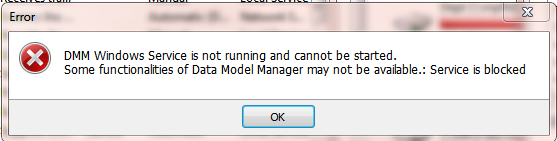
When trying to open MiCOM S1 Studio version 5.1 or 5.3 Data Model Manager the below error appears:
Product Line
MiCOM S1 Studio version 5.1 and 5.3
Environment
Data Model Manager for MiCOM S1 Studio
Causes
Customer's permissions on the computer are causing the service from starting or checking the status of the service SEDMMWinService.
Resolution
Version 5.1 follow the pdf called Instructions to collect details on Data Model Manager startup issue in MiCOM S1 Studio V5.1.0.pdf. If the issue is still present follow the document named 'Data Model Manager Error.pdf'.
Version 5.3 just follow the document called 'Data Model Manager Error.pdf'.
When trying to open MiCOM S1 Studio version 5.1 or 5.3 Data Model Manager the below error appears:
Product Line
MiCOM S1 Studio version 5.1 and 5.3
Environment
Data Model Manager for MiCOM S1 Studio
Causes
Customer's permissions on the computer are causing the service from starting or checking the status of the service SEDMMWinService.
Resolution
Version 5.1 follow the pdf called Instructions to collect details on Data Model Manager startup issue in MiCOM S1 Studio V5.1.0.pdf. If the issue is still present follow the document named 'Data Model Manager Error.pdf'.
Version 5.3 just follow the document called 'Data Model Manager Error.pdf'.