


Video: How do I customize the display on the Altivar Process Drive?
Issue:
How do I adjust/customize the main display on the Altivar Process Drive?
Product Line:
Altivar Process Drive (ATV630, ATV930, ATV650, ATV950, ATV660, ATV960, ATV680, ATV980)
Environment:
All serial numbers for Altivar Process Drive
Resolution:
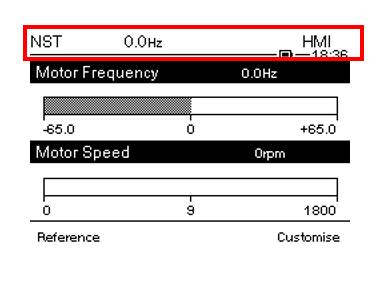
To adjust parameters on the top of the screen
- [My preferences] [Customization] [Param. Bar Select]
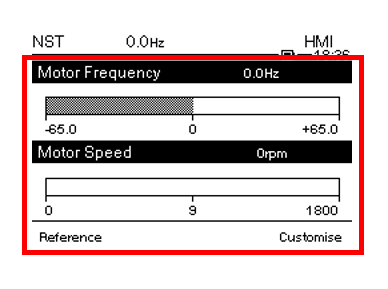
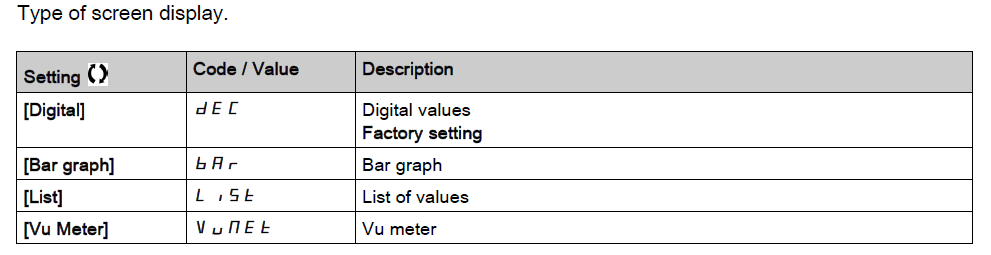
To adjust parameters in the middle of the startup screen
- [My preferences] [Customization] [Display Screen Type] [MPC]
How do I adjust/customize the main display on the Altivar Process Drive?
Product Line:
Altivar Process Drive (ATV630, ATV930, ATV650, ATV950, ATV660, ATV960, ATV680, ATV980)
Environment:
All serial numbers for Altivar Process Drive
Resolution:
To adjust parameters on the top of the screen
- [My preferences] [Customization] [Param. Bar Select]
To adjust parameters in the middle of the startup screen
- [My preferences] [Customization] [Display Screen Type] [MPC]
Udgivet til: Schneider Electric Danmark
