


How can I read %I/Q or %M on my M221, M241, M251, M262, M258 or LMC058 controller using Modbus ?
2 cases have to be considered: M221 or (M241, M251, M262, M258 and LMC058).
M221 :
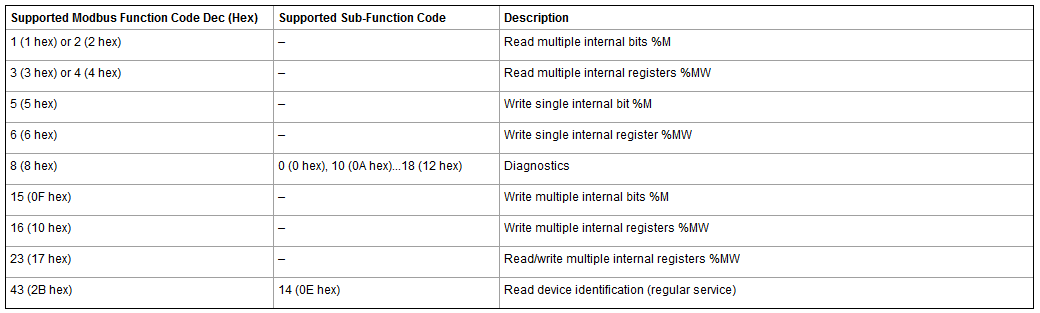
%M (internal bits) can be accessed using function codes from the table below (extracted from Machine Expert - Basic online help).
Note that %I (physical inputs) and %Q (physical outputs) can not be accessed directly by Modbus.
M241, M251, M262, M258 and LMC058:
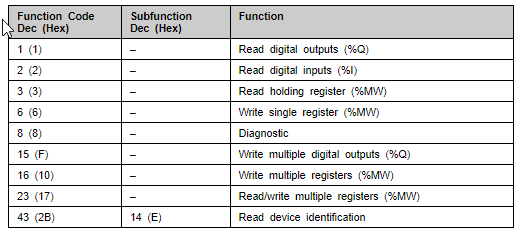
%M (internal bits) cannot be accessed by Modbus.
But %I (physical inputs) and %Q (physical outputs) can be accessed using function codes from the table below (extracted from Machine Expert online help).
M221 :
%M (internal bits) can be accessed using function codes from the table below (extracted from Machine Expert - Basic online help).
Note that %I (physical inputs) and %Q (physical outputs) can not be accessed directly by Modbus.
M241, M251, M262, M258 and LMC058:
%M (internal bits) cannot be accessed by Modbus.
But %I (physical inputs) and %Q (physical outputs) can be accessed using function codes from the table below (extracted from Machine Expert online help).