


How to display the "Deadband" values on the DNP 3.0 Map Setup in ION Setup.
Issue
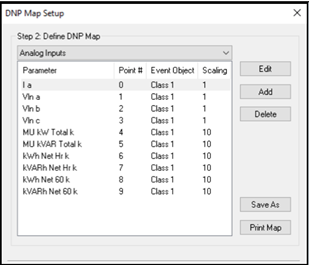
In the DNP 3.0 Map Setup, the "Deadband" was not viewable to user as illustrated in the following picture.
DNP 3.0 Map Setup before update
Product Line
ION Setup 3.1 (Software update)
Environment
ION Setup Software
Resolution
In ION Setup the information for the "Deadband" in DNP 3.0 Map Setup was available, but not in the view of user. For convenience and view ability of the user, an update was made in ION Setup Software.
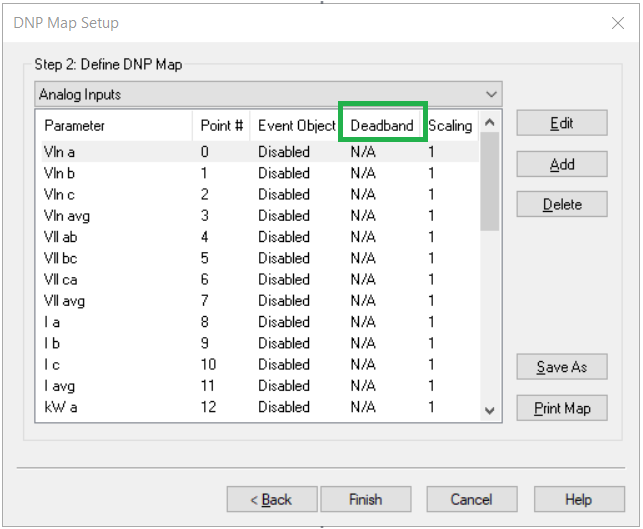
The following picture is the ION Setup V3.1 now supports the Deadband being viewable.
DNP 3.0 Map Setup after update
To check for updates for ION Setup please use following link:
ION Setup Latest Release
In the DNP 3.0 Map Setup, the "Deadband" was not viewable to user as illustrated in the following picture.
DNP 3.0 Map Setup before update
Product Line
ION Setup 3.1 (Software update)
Environment
ION Setup Software
Resolution
In ION Setup the information for the "Deadband" in DNP 3.0 Map Setup was available, but not in the view of user. For convenience and view ability of the user, an update was made in ION Setup Software.
The following picture is the ION Setup V3.1 now supports the Deadband being viewable.
DNP 3.0 Map Setup after update
To check for updates for ION Setup please use following link:
ION Setup Latest Release