Hvordan kan vi hjælpe dig i dag?

Can I retrieve a configuration in Product Selector?

Only if the configuration has been saved with an **.se file or if you saved the Product Code
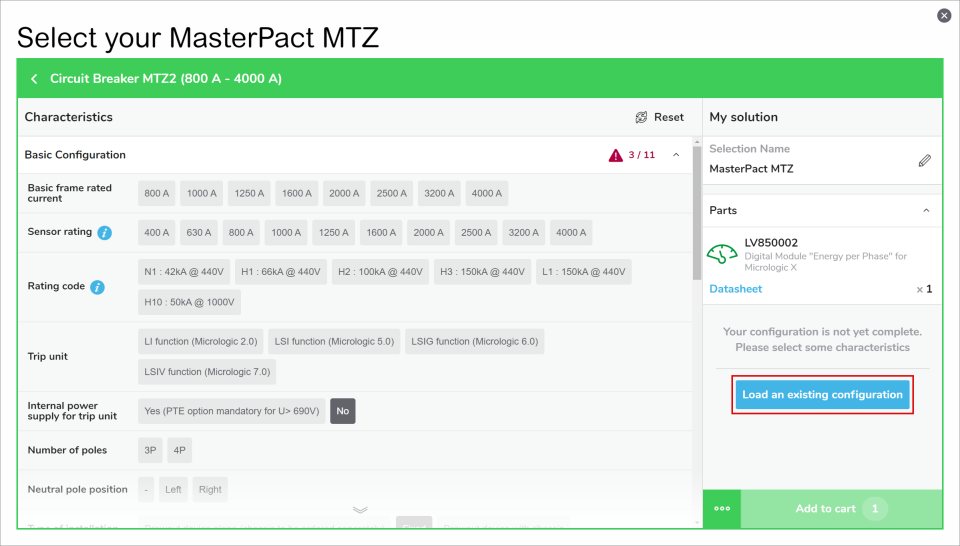
  • Retrieve a configuration with the .se file. Please open any selector and click on the "Load an existing configuration" at the right of the screen. Or click on the "" at the left of the "Add to cart" button, then select "Load an existing configuration". You will then be able to browse in your computer for the .se file, click OK and you will retrieve the full selection and basket.
  • Retrieve a configuration with a Product Code, only for configured product. Please open a selector and click on the "" at the left of the "Add to cart" button, then select "Load an existing configuration"

Schneider Electric Danmark

Brug for hjælp?

Brug for hjælp?

Produktvælger

Produktvælger

Find hurtigt og nemt de rette produkter og det rette tilbehør til dine anvendelser.

Få et tilbud

Få et tilbud

Start din salgsforespørgsel online, så vil du blive kontaktet af en ekspert.

Find forhandler

Find forhandler

Find den nærmeste Schneider Electric-distributør.

Hjælpecenter

Hjælpecenter

Find supportressourcer til alle dine behov på ét sted.

  • Produktdokumentation
  • Download af software
  • Produktvælger
  • Udskiftning og erstatning af produkter
  • Hjælp og kontaktcenter
  • Find forhandler
  • Projektrådgivning
  • Find vores kontorer
  • Schneider Electric Community
  • Karriere
  • Virksomhedsprofil
  • Rapportér en forseelse
  • Tilgængelighed
  • Presserum
  • Investorer
  • EcoStruxure
  • Jobsøgning
  • Blog
  • Privatlivspolitik
  • Cookiemeddelelse
  • Vilkår for anvendelse
  • Rediger dine cookieindstillinger