


How to access the REAC_OUT parameter for the 'BMXDDM16022' module located on an ERIO rack.
Issue
This resolution explains how to access the REAC_OUT parameter for the 'BMXDDM16022' module located on an ERIO rack.
Product Line
BMXDDM16022, Unity
Environment
Unity
Resolution
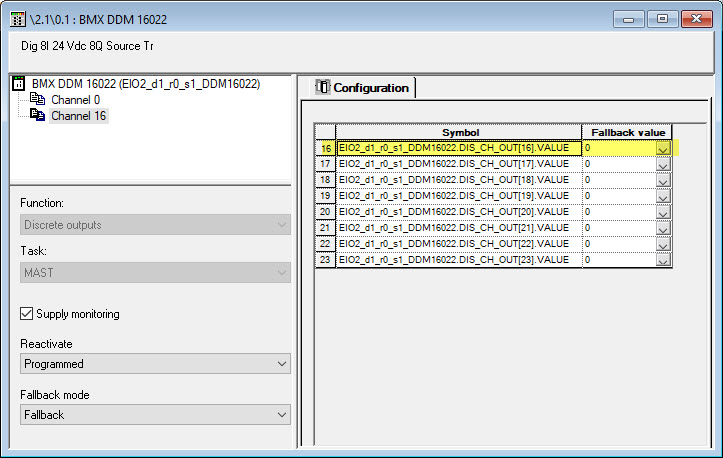
The following steps can be used to access and set the REAC_OUT parameter for the 'BMXDDM16022' module located on an ERIO rack. (In this example, the 'BMXDDM16022' module is located in slot 1 of the ERIO rack. We will be setting the REAC_OUT' bit for channel 16)
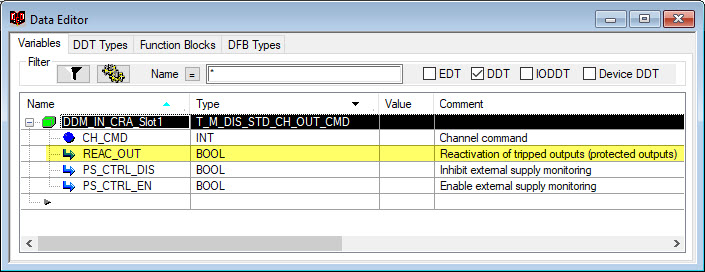
Expanding the DDT variable will show the 'REAC_OUT' bit.
This resolution explains how to access the REAC_OUT parameter for the 'BMXDDM16022' module located on an ERIO rack.
Product Line
BMXDDM16022, Unity
Environment
Unity
Resolution
The following steps can be used to access and set the REAC_OUT parameter for the 'BMXDDM16022' module located on an ERIO rack. (In this example, the 'BMXDDM16022' module is located in slot 1 of the ERIO rack. We will be setting the REAC_OUT' bit for channel 16)
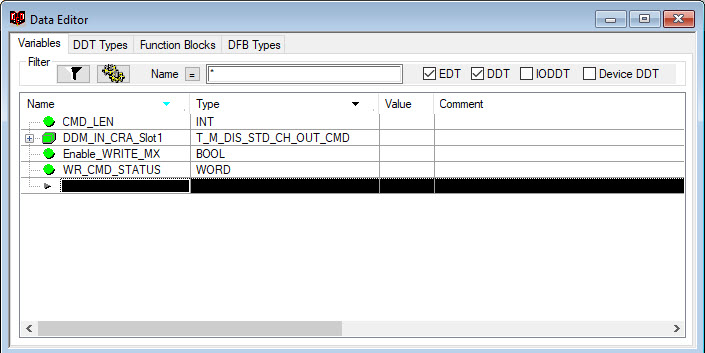
- Create a DDT variable with the type ' T_M_DIS_STD_CH_OUT_CMD'. (This variable will be used to access the REAC_OUT parameter for the BMXDDM16022 module located on the ERIO rack.)
- Create a variable of the type 'BOOL' . (This will be used to enable the 'WRITE_CMD_MX' block
- Create a variable of the type 'WORD'. (This is used to monitor the status of the 'WRITE"CMD MX' block.
- Create a variable of the type 'INT'. (This is used to define the length of the command for the 'WRITE_CMD_MX' block to send)
Expanding the DDT variable will show the 'REAC_OUT' bit.
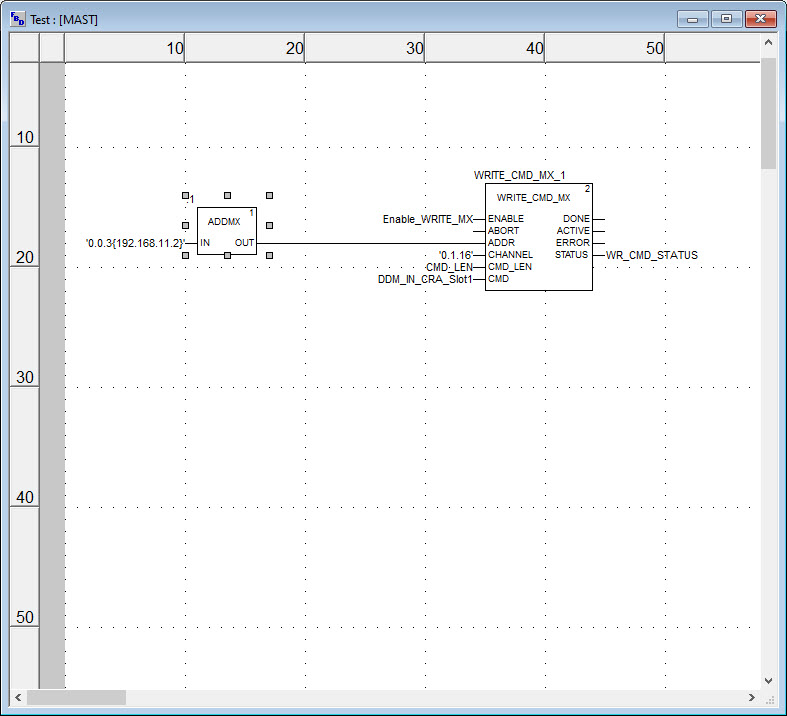
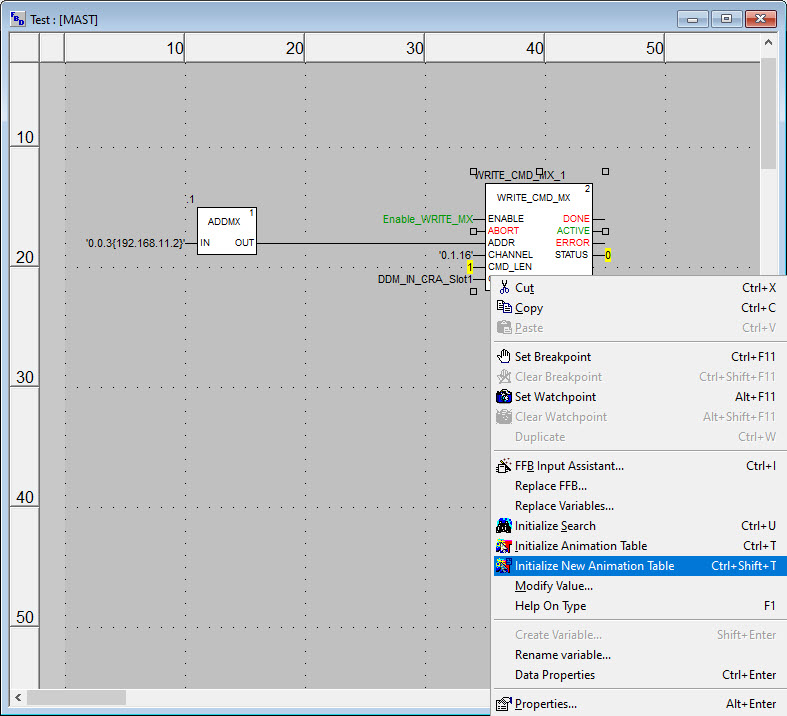
- Add the following FBD logic to the Unity application:
- Change the input to the 'ADDM' block to match your application
- 0.0.3 refers to the CPU rack, slot and channel. (This should not be changed)
- In this example, 192.168.11.2 is the IP address of the 'BMXCRA31210' module
- Assign the variables that were created earlier, to the 'WRITE CMD MX' block.
- Assign the 'CHANNEL' parameters. (This is the location of the 'BMXDDM16022' module on the ERIO rack and the channel to set the REAC_OUT parameter. In this example, we use rack 0, slot 1, channel 16)
- Build the changes.
- Transfer the application to the PLC.
- Open the FBD section for the WRITE_CMD_MX' block.
- Right click on the WRITE_CMD_MX' block.
- Select 'Initialize a new animation table'.
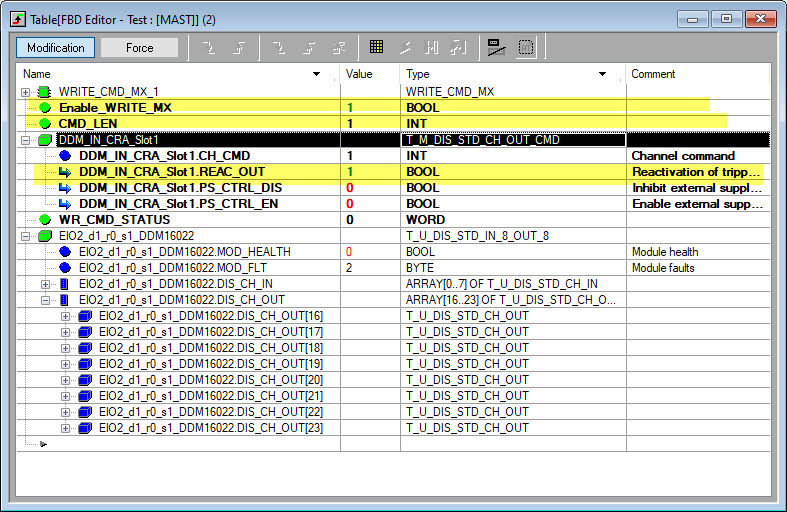
- Expand the CMD variable
- Set the 'CMD_LEN' value to 1 word. (This should always be set to 1)
- Set the REAC_OUT' variable to a value of 1.
- Set the enable variable for the 'WRITE_CMD_MX' block to a value of 1 to send the REAC_OUT command.(i.e., 'Enable_WRITE_MX')