


How to verify the BMXNOR0200H NTP Client service status inside the Control Expert application?
Issue:
How to verify the BMXNOR0200H NTP Client service status inside the Control Expert application?
Product Line:
Modicon M580 Controller, M340, BMXNOR0200H, BMXNOR0200.
Environment:
All
Resolution:
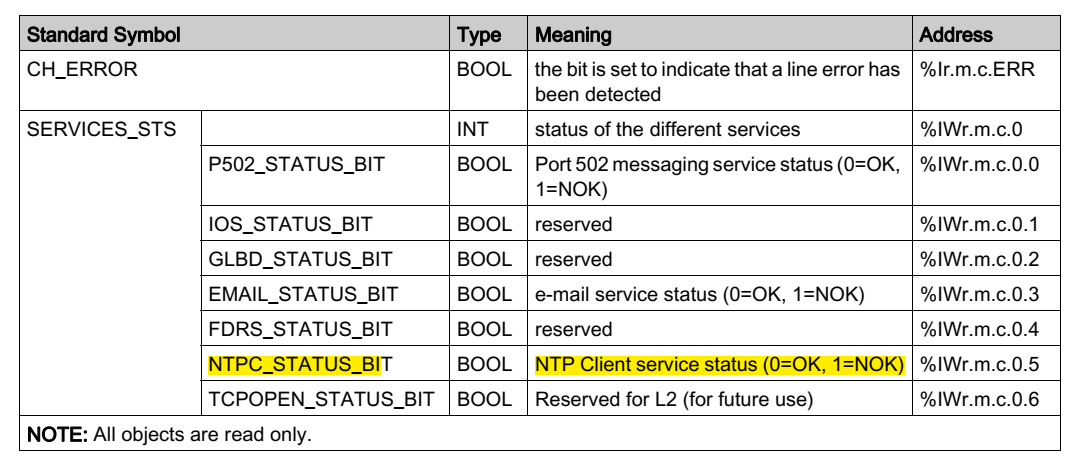
We can use the implicit exchange using the IODDT of type T_COM_ETH_BMX as described below and verify the NTPC_STATUS_BIT #5.
Note: This status bit tells only whether the BMXNOR0200H NTP Client service is activated configured and running or not. It will not tell the NTP Server connection status.
How to verify the BMXNOR0200H NTP Client service status inside the Control Expert application?
Product Line:
Modicon M580 Controller, M340, BMXNOR0200H, BMXNOR0200.
Environment:
All
Resolution:
We can use the implicit exchange using the IODDT of type T_COM_ETH_BMX as described below and verify the NTPC_STATUS_BIT #5.
Note: This status bit tells only whether the BMXNOR0200H NTP Client service is activated configured and running or not. It will not tell the NTP Server connection status.