


How to import the variables into VJD in Machine Expert V1.2
How to import the variables into Vijeo Designer in Machine Expert V1.2?
Machine Expert V1.2 & Vijeo Designer 6.2.
Here is the steps to import the variables into VJD: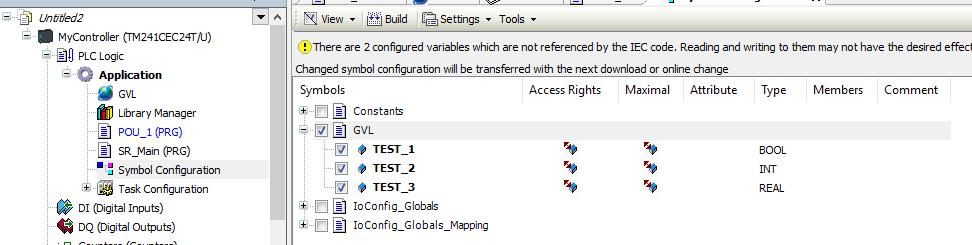
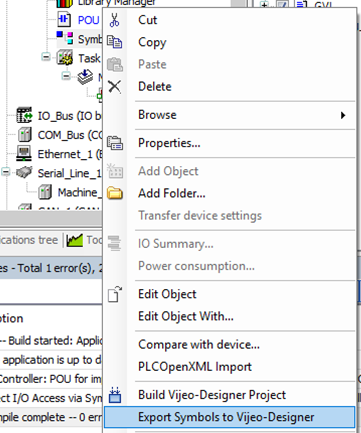
Then click “Export Symbols to Vijeo-Designer” in below picture.
FAQ applies to Machine Expert V1.2 & Vijeo Designer 6.2 SP9.1.
Machine Expert V1.2 & Vijeo Designer 6.2.
Here is the steps to import the variables into VJD:
- Create new variables and add them into PLC program(POU).
- Add Symbol Configuration in the PLC application, Tick the box before the variables that will be used in HMI.
Then click “Export Symbols to Vijeo-Designer” in below picture.
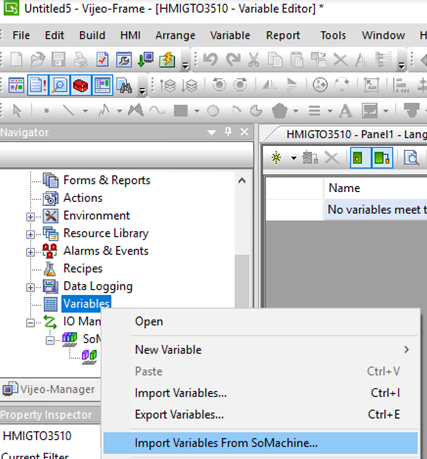
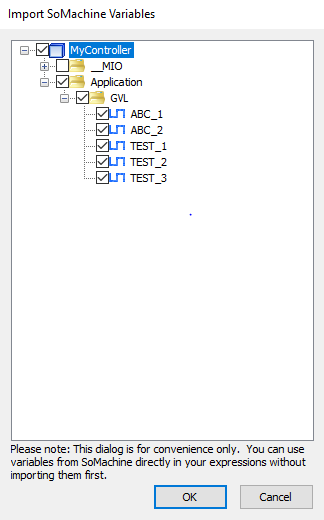
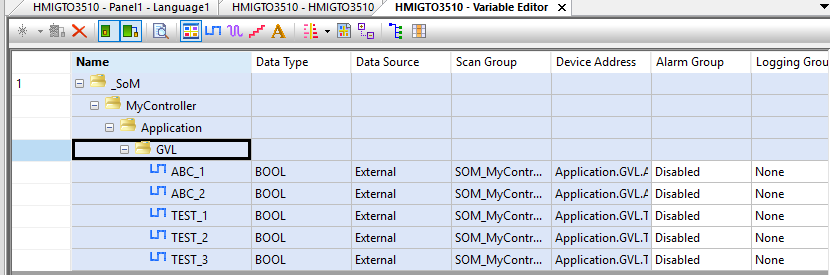
- In Vijeo Designer,click “Import Variables From SoMachine…” ,select the variables and click “ok”, the variables will be imported to Vijeo Designer.
FAQ applies to Machine Expert V1.2 & Vijeo Designer 6.2 SP9.1.