Hvordan kan vi hjælpe dig i dag?

Unable to install PLC-USB driver due to user conflict

Installing the 'SchneiderPLCUSBDriverSuite V14.15.0.0' returns the following error.:
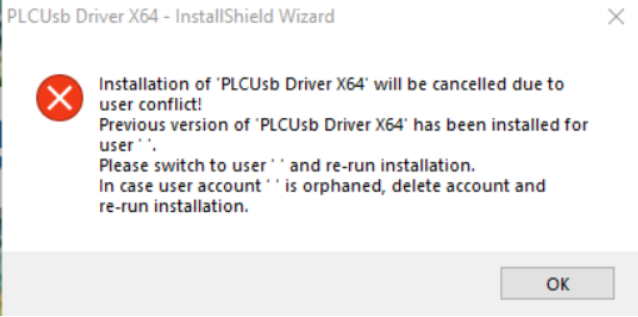
PLCUSB Driver

Use the following steps to run the ps1 file named 'Release-PerUserDrivers.ps1' can be used to resolve the issue.

  • Browse to the location you stored the ps1-file in File Explorer and choose; File-> Open Windows PowerShell.
  • Type (part of) the name of the script.
  • Press TAB to auto complete then name. Note: Do this even when you typed the name in full. ...
  • Press ENTER to execute the script.
Note: This doesn’t uninstall the old driver versions, but it deletes any 'SchneiderPLCUSBDriverSuite' installer related
registry keys that causes Windows to detect and refuse the install/uninstall of the driver components..

Schneider Electric Danmark

Bilag
Release-PerUserDrivers.ps1.txt [16.07 KB]
Se mere
Område:
Se mere
Område:

Brug for hjælp?

Brug for hjælp?

Produktvælger

Produktvælger

Find hurtigt og nemt de rette produkter og det rette tilbehør til dine anvendelser.

Få et tilbud

Få et tilbud

Start din salgsforespørgsel online, så vil du blive kontaktet af en ekspert.

Find forhandler

Find forhandler

Find den nærmeste Schneider Electric-distributør.

Hjælpecenter

Hjælpecenter

Find supportressourcer til alle dine behov på ét sted.

  • Produktdokumentation
  • Download af software
  • Produktvælger
  • Udskiftning og erstatning af produkter
  • Hjælp og kontaktcenter
  • Find forhandler
  • Projektrådgivning
  • Find vores kontorer
  • Schneider Electric Community
  • Karriere
  • Virksomhedsprofil
  • Rapportér en forseelse
  • Tilgængelighed
  • Presserum
  • Investorer
  • EcoStruxure
  • Jobsøgning
  • Blog
  • Privatlivspolitik
  • Cookiemeddelelse
  • Vilkår for anvendelse
  • Rediger dine cookieindstillinger