


BCM Summary button does not open branch circuit view on the HDPM6000 HMI
Issue
Selecting the "BCM Summary" button on the HDPM6000 HMI does not open the circuit view to view the individual branches. The button appears to not be working.
Product line
HDPM6000
HDPM6000 HMI
Resolution
1. Open the HDPM6000 web page and login
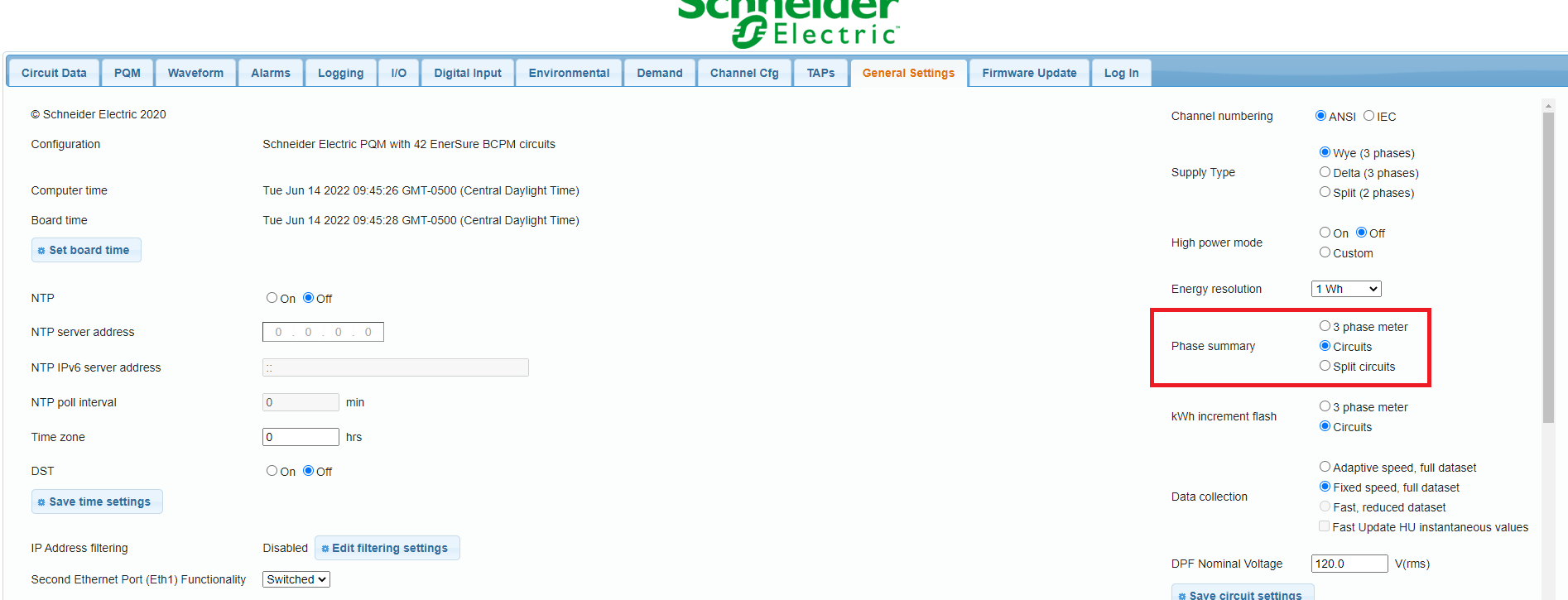
2. Navigate to the "General Settings" tab
3. Set the "Phase summary" setting to "Circuits" or "Split Circuits"
4. Select the "Save circuit settings"
If "3 phase meter" is selected on the web page settings, the HMI will not show the branches when the "BCM Summary" button is pressed.
Selecting the "BCM Summary" button on the HDPM6000 HMI does not open the circuit view to view the individual branches. The button appears to not be working.
Product line
HDPM6000
HDPM6000 HMI
Resolution
1. Open the HDPM6000 web page and login
2. Navigate to the "General Settings" tab
3. Set the "Phase summary" setting to "Circuits" or "Split Circuits"
4. Select the "Save circuit settings"
If "3 phase meter" is selected on the web page settings, the HMI will not show the branches when the "BCM Summary" button is pressed.