Hvordan kan vi hjælpe dig i dag?

How to display special characters in a Web Visualization of EcoStruxure Machine Expert?

Special characters (e.g. Arabic, Cyrillic, ...) may not display correctly with EcoStruxure Machine Expert's default settings. In order to display them correctly, the setting 'Use unicode strings' must be activated in the visualization manager.
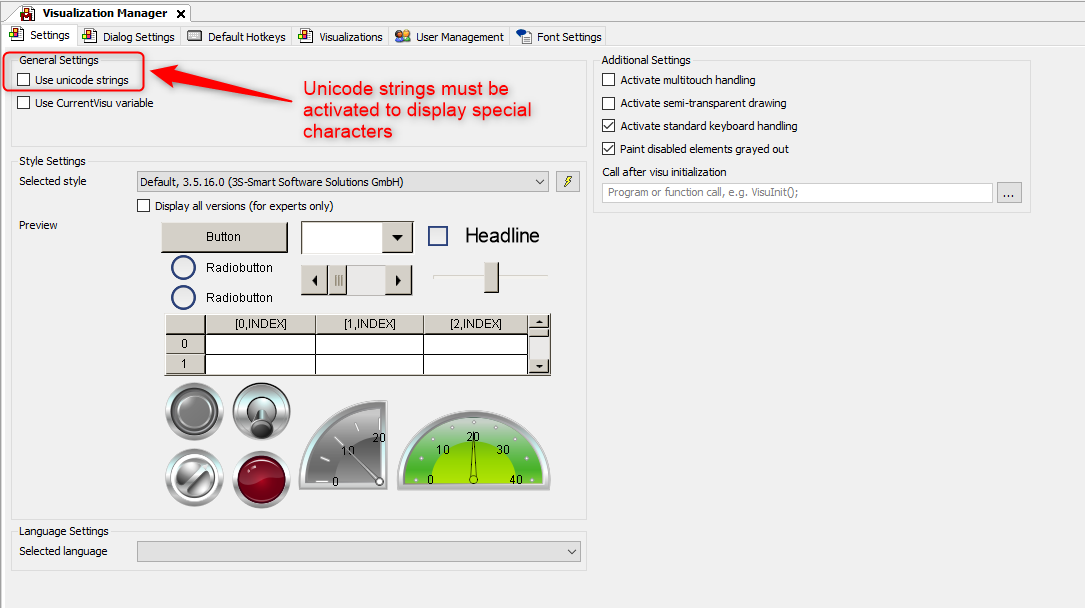
Visualization Manager settings for Web Visualization with special characters

Machine Expert works with the ASCII format by default, which is why you need to activate the setting if you want to use special characters in your visualization

Schneider Electric Danmark

Se mere
Område:
Se mere
Område:

Brug for hjælp?

Brug for hjælp?

Produktvælger

Produktvælger

Find hurtigt og nemt de rette produkter og det rette tilbehør til dine anvendelser.

Få et tilbud

Få et tilbud

Start din salgsforespørgsel online, så vil du blive kontaktet af en ekspert.

Find forhandler

Find forhandler

Find den nærmeste Schneider Electric-distributør.

Hjælpecenter

Hjælpecenter

Find supportressourcer til alle dine behov på ét sted.

  • Produktdokumentation
  • Download af software
  • Produktvælger
  • Udskiftning og erstatning af produkter
  • Hjælp og kontaktcenter
  • Find forhandler
  • Projektrådgivning
  • Find vores kontorer
  • Schneider Electric Community
  • Karriere
  • Virksomhedsprofil
  • Rapportér en forseelse
  • Tilgængelighed
  • Presserum
  • Investorer
  • EcoStruxure
  • Jobsøgning
  • Blog
  • Privatlivspolitik
  • Cookiemeddelelse
  • Vilkår for anvendelse
  • Rediger dine cookieindstillinger