


PRM[1.2]: How to sent DPV1 Class2 request using PRM with M580?
Download PRM 1.2 package from Schneider web then install the DTM and DFB from the package.
1/ Add a DTM: PRM_Gateway as a DIO device under M580 DTM, set IP address; no need to add any profibus slave under PRM_Master/Gateway, then connect and load the DTM configuration into PRM;
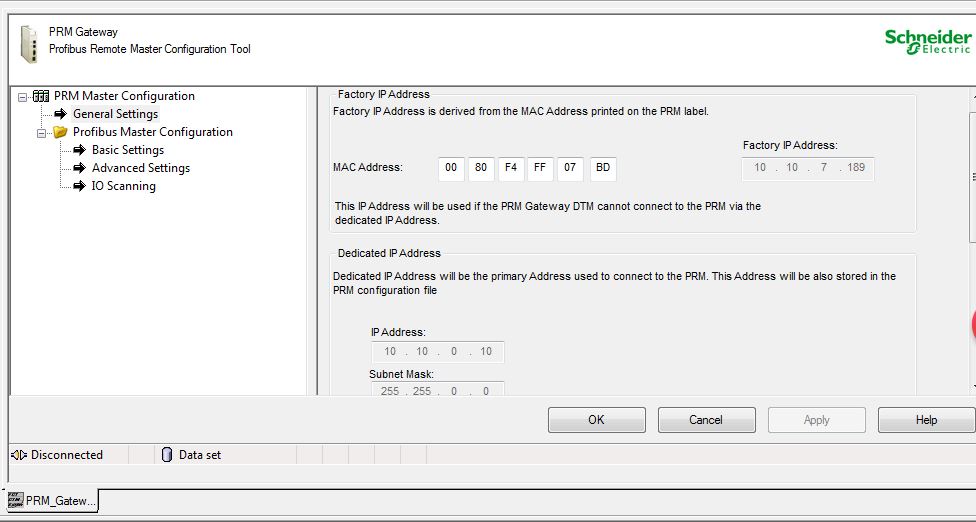
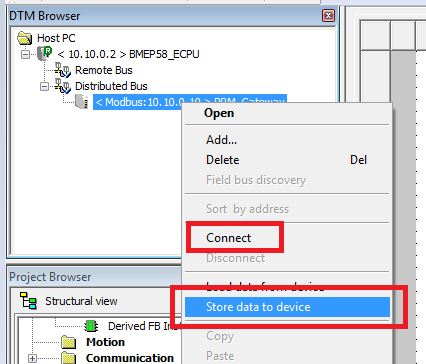
2/ Create a logic section, add PRM_MGT_M block for manage the PRM gateway module; please check the attached Library User Manual to know how to set the pins of PRM_MGT_M;
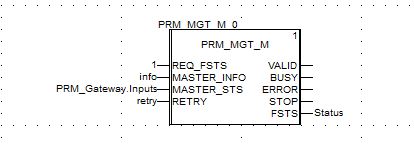
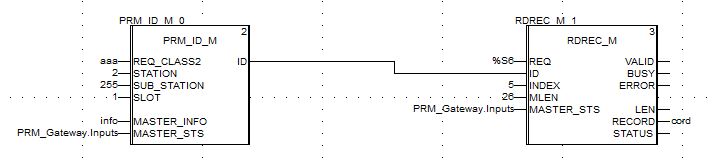
3/ Add other two DFBs "PRM_ID_M" and "RDREC_M"/"WRREC_M" for sending explicit messages;
"Class 2" is chosen if the REQ_CLASS2 input is set before starting the RDREC or WRREC blocks, so set REQ_CLASS2 input for PRM_ID_M block will make block "RDREC_M"/"WRREC_M" sending Class2 DPV1 request.
To know how to set other pins of "PRM_ID_M" and "RDREC_M"/"WRREC_M" blocks please also find the attached Library User Manual.
1/ Add a DTM: PRM_Gateway as a DIO device under M580 DTM, set IP address; no need to add any profibus slave under PRM_Master/Gateway, then connect and load the DTM configuration into PRM;
2/ Create a logic section, add PRM_MGT_M block for manage the PRM gateway module; please check the attached Library User Manual to know how to set the pins of PRM_MGT_M;
3/ Add other two DFBs "PRM_ID_M" and "RDREC_M"/"WRREC_M" for sending explicit messages;
"Class 2" is chosen if the REQ_CLASS2 input is set before starting the RDREC or WRREC blocks, so set REQ_CLASS2 input for PRM_ID_M block will make block "RDREC_M"/"WRREC_M" sending Class2 DPV1 request.
To know how to set other pins of "PRM_ID_M" and "RDREC_M"/"WRREC_M" blocks please also find the attached Library User Manual.