


How to determine why the EGX300 is not logging or has missing intervals
Issue
EGX300 is not logging all intervals or has missing intervals when doing Onboard logging.
Product Line
EGX300
Environment
Data logging on board of the EGX300
Cause
The onboard .cvs file contains error codes that indicate what might be causing the EGX to not log.
Resolution
1) Open a Windows Explorer window and navigate to ftp:\\<IP address> and look for the .csv file.
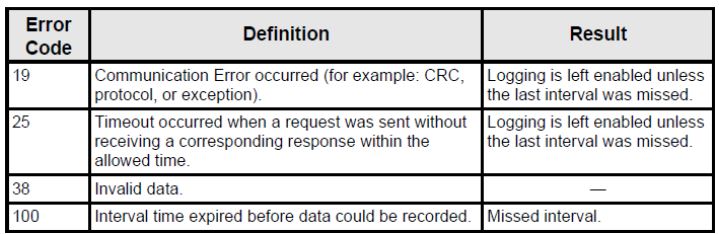
2) Open the .csv file and look for the following error codes. These codes give an indication as to what problems the EGX is encountering when attempting to log data.
EGX300 is not logging all intervals or has missing intervals when doing Onboard logging.
Product Line
EGX300
Environment
Data logging on board of the EGX300
Cause
The onboard .cvs file contains error codes that indicate what might be causing the EGX to not log.
Resolution
1) Open a Windows Explorer window and navigate to ftp:\\<IP address> and look for the .csv file.
2) Open the .csv file and look for the following error codes. These codes give an indication as to what problems the EGX is encountering when attempting to log data.