


Errors while Finalizing the Commissioning in offline mode in EPC Mobile application
When there is no internet connection and you are completely offline while Finalizing the commissioning in EcoStruxure Power Commissioning Mobile application, you get the below errors Pic 1 and Pic 2
Pic 1 Pic 2

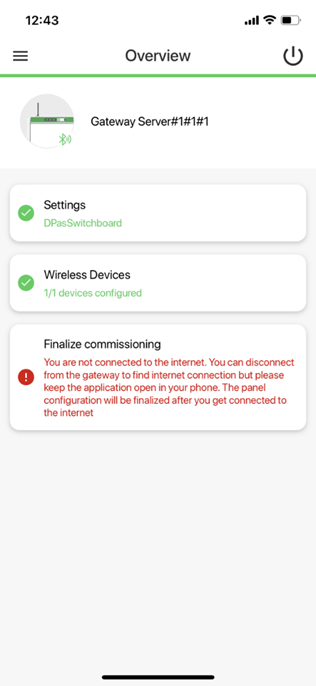
In this case where you are completely offline and cannot connect to internet, finalizing the commissioning process does not work and you get the above errors.
But EPC mobile ensures your Finalize commissioning step works once you are back to online (once you are connected to internet), without you again clicking the “Finalize commissioning” option.
For this feature to work, you need to make sure your application is running in the background and it is not closed. Once you are back to online, it sends you a notification on the success of the finalize commissioning process
Pic 1 Pic 2
In this case where you are completely offline and cannot connect to internet, finalizing the commissioning process does not work and you get the above errors.
But EPC mobile ensures your Finalize commissioning step works once you are back to online (once you are connected to internet), without you again clicking the “Finalize commissioning” option.
For this feature to work, you need to make sure your application is running in the background and it is not closed. Once you are back to online, it sends you a notification on the success of the finalize commissioning process